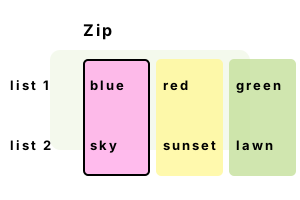
Zip. The C# Zip extension method acts upon 2 collections. It processes each element in 2 series together. Zip() is found in System.Linq, so we must include this namespace.
Func info. With a Func instance, we use Zip to handle elements from two collections in parallel. Any IEnumerable can be zipped.
Example. We declare 2 string arrays. Then, we invoke the Zip method. The first argument to the Zip method is the secondary array we want to process in parallel.
using System;
using System.Linq;
// Two source arrays.
var array1 = new string[] { "blue", "red", "green" };
var array2 = new string[] { "sky", "sunset", "lawn" };
// Concatenate elements at each position together.
var zip = array1.Zip(array2, (a, b) => (a + "=" + b));
// Look at results.
foreach (var value in zip)
{
Console.WriteLine("ZIP: {0}", value);
}ZIP: blue=sky
ZIP: red=sunset
ZIP: green=lawn
Unequal counts. If you happen to have 2 collections with an unequal number of elements, the Zip method will only continue to the shortest index where both elements exist.
Info No errors will occur if the two collections are uneven. Zip will not throw an exception if the two collections are of unequal length.
using System;
using System.Linq;
var test1 = new int[] { 1, 2 };
var test2 = new int[] { 3 };
// Zip unequal collections.
var zip = test1.Zip(test2, (a, b) => (a + b));
foreach (var value in zip)
{
Console.WriteLine(value);
}4
A summary. Zip() processes 2 collections or series in parallel. This can replace a lot of for-loops where the index variable is necessary to process 2 arrays at once.
Dot Net Perls is a collection of tested code examples. Pages are continually updated to stay current, with code correctness a top priority.
Sam Allen is passionate about computer languages. In the past, his work has been recommended by Apple and Microsoft and he has studied computers at a selective university in the United States.