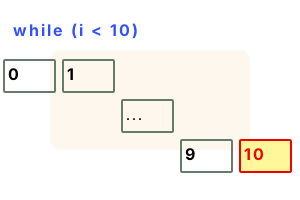
While. Most of the time, a foreach-loop is the clearest in C# code. But sometimes we need an infinite loop, or one that continues until a condition is met.
This loop continues until its expression evaluates to false. We can use a while-true loop for an infinite loop—or one with complex exit conditions.
An example. This program shows a while-loop. The while-keyword is followed by an expression. This expression must evaluate to a boolean value (true or false).
Info The expression is evaluated each time the loop is encountered. If the result is true, the loop body statements are executed.
Here This loop will be entered only if "i" is less than 10—a while-loop may never be entered.
Then The loop body statements are executed. Before it executes again, the condition is evaluated to true or false.
using System;
// Continue in while-loop until index is equal to 10.
int i = 0;
while (i < 10)
{
Console.Write("While statement ");
// Write the index to the screen.
Console.WriteLine(i);
// Increment the variable.
i++;
}While statement 0
While statement 1
While statement 2
While statement 3
While statement 4
While statement 5
While statement 6
While statement 7
While statement 8
While statement 9
While true. We can use "true" in the expression of a while-loop. This program uses a while-true loop. An empty while-loop with this condition is (by definition) an infinite loop.
Tip We can use while-true loops with good results if we carefully provide exit conditions in the loop body.
Detail The while-true loop is sometimes a clearer and more self-documenting loop style than other styles.
using System;
int index = 0;
// Continue looping infinitely until internal condition is met.
while (true)
{
int value = ++index;
// Check to see if limit is hit.
if (value > 5)
{
Console.WriteLine("While-loop break");
break;
}
// You can add another condition.
if (value > 100)
{
throw new Exception("Never hit");
}
// Write to the screen on each iteration.
Console.WriteLine("While-loop statement");
}While-loop statement
While-loop statement
While-loop statement
While-loop statement
While-loop statement
While-loop break
Variable assignment. Here we assign a variable in a while-loop's expression. We can alias a variable for use in the loop body. This is useful if the expression is slow or complex.
Detail We can sometimes eliminate duplicate evaluations of the expression and improve performance.
using System;
class Program
{
static void Main()
{
int value = 4;
int i;
// You can assign a variable in the while-loop condition statement.
while ((i = value) >= 0)
{
// In the while-loop body, both "i" and value are equal.
Console.WriteLine("While {0} {1}", i, value);
value--;
}
}
}While 4 4
While 3 3
While 2 2
While 1 1
While 0 0
Implicitly convert type error. The condition of a while-loop must evaluate to true or false. In C# an int never evaluates to true or false—we must use an equality test.
class Program
{
static void Main()
{
int number = 10;
while (number)
{
}
}
}Error CS0029
Cannot implicitly convert type 'int' to 'bool'class Program
{
static void Main()
{
int number = 10;
while (number > 0)
{
number--;
}
}
}
Do While. This is a less common loop in C#. It is an inverted version of the while-loop. It executes the loop statements unconditionally the first time.
using System;
class Program
{
static void Main()
{
int number = 0;
// Begin do-while loop.// ... Terminates when number equals 2.
do
{
Console.WriteLine(number);
// Add one to number.
number++;
} while (number <= 2);
}
}0
1
2
Empty statement. Suppose we want a while-loop with no statements in its body. We can use an empty statement. An empty block would also work.
Note The C# specification covers the "empty statement" as part of the language's grammar. It is included here for completeness.
Tip The empty statement can be used anywhere, but it tends to make most sense in a while-loop body.
using System;
class Program
{
static void Main()
{
// Use an empty statement as the body of the while-loop.
while (Method())
;
}
static int _number;
static bool Method()
{
// Write the number, increment, and then return a bool.
Console.WriteLine(_number);
_number++;
return _number < 5;
}
}0
1
2
3
4
Jump statements. In the C# language we can use break, return and goto to change control flow in a while-loop. We can think of control flow (how statements are encountered) like a river.
Return In this program we exit the ReturnIf5 method, and its inner while-loop, when a certain value is reached. We use the return keyword.
using System;
class Program
{
static void ReturnIf5()
{
// Keep looping until a condition is reached, and return then.
int index = 0;
while (true)
{
if (index == 5)
{
Console.WriteLine("5 REACHED");
return;
}
Console.WriteLine("NOT FOUND");
index++;
}
}
static void Main()
{
ReturnIf5();
}
}NOT FOUND
NOT FOUND
NOT FOUND
NOT FOUND
NOT FOUND
5 REACHED
A summary. A while-loop continues until its condition expression is false. This can make looping logic easier to reason about—which is a significant benefit.
Dot Net Perls is a collection of tested code examples. Pages are continually updated to stay current, with code correctness a top priority.
Sam Allen is passionate about computer languages. In the past, his work has been recommended by Apple and Microsoft and he has studied computers at a selective university in the United States.
This page was last updated on Nov 10, 2023 (simplify).