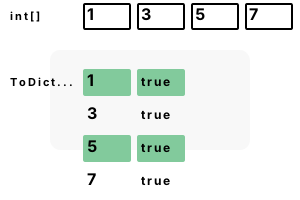
First example. Building up dictionaries can require a significant amount of code. When we use ToDictionary, we can use less code to create a Dictionary.
Part 1 We initialize an array of 4 integers, all odd numbers. These ints will be used to create a Dictionary.
Part 2 We invoke ToDictionary. The 2 arguments to ToDictionary are lambdas: the first sets each key, and the second sets each value.
Part 3 We specify a lambda. For keys, we use the ints from the array. For the values, we return "true" no matter what the key is.
using System;
using System.Collections.Generic;
using System.Linq;
class Program
{
static void Main()
{
// Part 1: create example integer array.
int[] values = new int[] { 1, 3, 5, 7 };
// Part 2: call ToDictionary.// Part 3: specify lambda as argument.
Dictionary<int, bool> dictionary =
values.ToDictionary(v => v, v => true);
// Display all keys and values.
foreach (KeyValuePair<int, bool> pair in dictionary)
{
Console.WriteLine(pair);
}
}
}[1, True]
[3, True]
[5, True]
[7, True]
String example. Dictionaries are most useful for strings and string lookups. This allows us to use a number (hash code) in place of a string, greatly speeding things up.
Also Here we use the var keyword to simplify the syntax. Var helps reduce repetitive syntax.
using System;
using System.Collections.Generic;
using System.Linq;
class Program
{
static void Main()
{
// Example with strings and List.
List<string> list = new List<string>() { "cat", "dog", "animal" };
var animals = list.ToDictionary(x => x, x => true);
if (animals.ContainsKey("dog"))
{
// This is in the Dictionary.
Console.WriteLine("dog exists");
}
}
}dog exists
IEqualityComparer. The ToDictionary method can receives a third argument, an IEqualityComparer. Here we use StringComparer.OrdinalIgnoreCase to create a case-insensitive dictionary.
using System;
using System.Collections.Generic;
using System.Linq;
class Program
{
static void Main()
{
List<string> list = new List<string>() { "cat", "bird" };
// Create case-insensitive dictionary.
var pets = list.ToDictionary(x => x,
x => true,
StringComparer.OrdinalIgnoreCase);
if (pets.ContainsKey("CAT"))
{
Console.WriteLine("CAT exists");
}
}
}CAT exists
Notes, LINQ. ToDictionary allows us to use fewer lines of code to insert elements into a Dictionary. This method is elegant and fits well with other LINQ code.
A summary. We used ToDictionary to transform a collection (such as an array or List) into a Dictionary collection. This provides constant-time lookups.
Dot Net Perls is a collection of tested code examples. Pages are continually updated to stay current, with code correctness a top priority.
Sam Allen is passionate about computer languages. In the past, his work has been recommended by Apple and Microsoft and he has studied computers at a selective university in the United States.
This page was last updated on Apr 27, 2023 (edit).