TimeSpan. This .NET type represents a period of time. With it we use a host of helper functions to make managing time periods easier.
TimeSpan benefits. TimeSpan leads to simpler, more reliable VB.NET programs that act upon time representations. We can use helpful methods on TimeSpan.
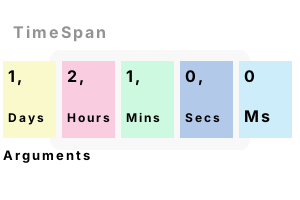
Constructor. The TimeSpan type has many useful constructors. These allow you to specify the exact period of time you want the TimeSpan to represent.
Here In this example, we specify a TimeSpan of one day, two hours, and 1 minute.
Tip Arguments to the TimeSpan constructor are ordered from largest unit of time to smallest.
Module Module1
Sub Main()
' Use the TimeSpan constructor.' ... Days, hours, minutes, seconds, milliseconds.
Dim span As TimeSpan = New TimeSpan(1, 2, 1, 0, 0)
Console.WriteLine(span)
End Sub
End Module1.02:01:00
TimeSpan.From. We can create a new TimeSpan instance in another way. The From functions allow you to specify a unit to create the TimeSpan from.
Tip You can specify days, hours, minutes, seconds or milliseconds and get a TimeSpan.
Module Module1
Sub Main()
' Get TimeSpan instances from a specific unit of time.
Dim span1 As TimeSpan = TimeSpan.FromDays(1)
Dim span2 As TimeSpan = TimeSpan.FromHours(1)
Dim span3 As TimeSpan = TimeSpan.FromMinutes(1)
Dim span4 As TimeSpan = TimeSpan.FromSeconds(1)
Dim span5 As TimeSpan = TimeSpan.FromMilliseconds(1)
Console.WriteLine(span1)
Console.WriteLine(span2)
Console.WriteLine(span3)
Console.WriteLine(span4)
Console.WriteLine(span5)
End Sub
End Module1.00:00:00
01:00:00
00:01:00
00:00:01
00:00:00.0010000
Add, Subtract. The TimeSpan type allows us to add and subtract instances. We can compute the total time or the difference between 2 TimeSpan instances.
Module Module1
Sub Main()
' Input TimeSpans.
Dim span1 As TimeSpan = TimeSpan.FromMinutes(1)
Dim span2 As TimeSpan = TimeSpan.FromMinutes(2)
' Add.
Dim span3 As TimeSpan = span1.Add(span2)
Console.WriteLine(span3)
' Subtract.
Dim span4 As TimeSpan = span2.Subtract(span1)
Console.WriteLine(span4)
End Sub
End Module00:03:00
00:01:00
Max, Min. On TimeSpan we can use the MaxValue, MinValue, and Zero constants. These return a TimeSpan instance that has been initialized to a special value.
And In many programs, you can use the TimeSpan.Zero constant as a default value for a TimeSpan.
Module Module1
Sub Main()
' Maximum, minimum, zero values.
Console.WriteLine(TimeSpan.MaxValue)
Console.WriteLine(TimeSpan.MinValue)
Console.WriteLine(TimeSpan.Zero)
End Sub
End Module10675199.02:48:05.4775807
-10675199.02:48:05.4775808
00:00:00
TicksPer. How can you convert ticks to other units of time? You can use the TimeSpan.TicksPer constants. These are on the TimeSpan type.
Module Module1
Sub Main()
' Display these constants.
Console.WriteLine(TimeSpan.TicksPerDay)
Console.WriteLine(TimeSpan.TicksPerHour)
Console.WriteLine(TimeSpan.TicksPerMinute)
Console.WriteLine(TimeSpan.TicksPerSecond)
Console.WriteLine(TimeSpan.TicksPerMillisecond)
End Sub
End Module864000000000
36000000000
600000000
10000000
10000
Duration. If you subtract a larger TimeSpan from a smaller TimeSpan, your result will be negative. You can then invoke Duration() to see the difference.
Module Module1
Sub Main()
' Convert this negative TimeSpan into a positive TimeSpan.
Dim span As TimeSpan = New TimeSpan(-1, -1, -1)
Dim duration As TimeSpan = span.Duration()
Console.WriteLine(duration)
End Sub
End Module01:01:01
Hours, TotalHours. The Hours returns the hours part of the TimeSpan. The TotalHours returns the entire TimeSpan represented by Hours.
Note The other Total properties on TimeSpan follow this same pattern. They represent the total time, not just a unit of it.
Module Module1
Sub Main()
' Compare Hours and TotalHours.
Dim span As TimeSpan = New TimeSpan(0, 500, 0, 0, 0)
Console.WriteLine(span.Hours)
Console.WriteLine(span.TotalHours)
End Sub
End Module20
500
Summary. TimeSpans are extremely useful in a wide variety of programs. We can use them to compute durations, and differences between 2 points in time.
Dot Net Perls is a collection of tested code examples. Pages are continually updated to stay current, with code correctness a top priority.
Sam Allen is passionate about computer languages. In the past, his work has been recommended by Apple and Microsoft and he has studied computers at a selective university in the United States.
This page was last updated on Feb 23, 2024 (edit link).