Switch. The C# switch statement provides an elegant way to run code based on a value. It is similar to an if-statement, but can be clearer (and even faster).
Performance of switch can be better, or worse, than if—testing is required for a sure gain. Pattern matching (with the "when" keyword) is available in switch.
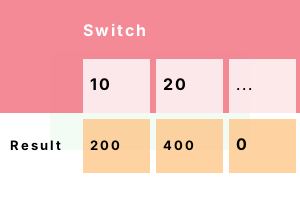
Statement. This program uses a switch statement. With a switch, it tests the int against several constants: 10, 20 and all others (default means all others).
Start The int value is assigned to 10. When control enters the switch, the first case is matched, so result is set to 200.
using System;
int value = 10;
// Use switch to get result.
int result;
switch (value)
{
case 10:
result = 200;
break;
case 20:
result = 400;
break;
default:
result = 0;
break;
}
Console.WriteLine($"{value}, {result}");10, 200
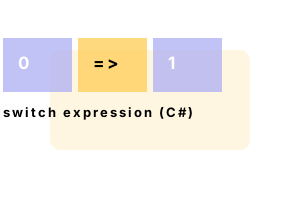
Expression. Here we see a switch expression. To use switch in an expression, we use the keyword switch after the variable name, not before.
And We use "fat" arrows after the cases, and separate the statements with commas not breaks.
using System;
// Use switch expression.
int value = 10;
int result = value switch {
10 => 200,
20 => 400,
_ => 0,
};
Console.WriteLine($"{value}, {result}");10, 200
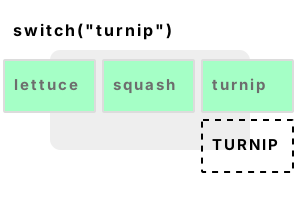
String example. Here we use switch() on a string value containing "turnip." The C# compiler detects a string switch and can optimize it with a Dictionary lookup.
Info Small string switches, like this one with just 3 cases, are often not compiled into Dictionaries. Performance is better this way.
using System;
string value = "turnip";
// ... Switch on the string.
switch (value)
{
case "lettuce":
Console.WriteLine("LETTUCE");
break;
case "squash":
Console.WriteLine("SQUASH");
break;
case "turnip":
Console.WriteLine("TURNIP");
break;
}TURNIP
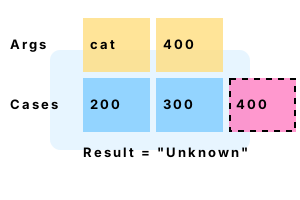
Goto, case default. We can use goto statements in switches. These are different from other gotos. With goto we can run multiple cases for a single expression.
Important Are you breaking out of a switch, or out of the enclosing loop? Scope is important. The deepest construct is broken first.
using System;
class Program
{
static void TestNameAndCode(string name, int code)
{
switch (code)
{
case 200:
case 300:
case 400:
if (name == "bird")
{
Console.WriteLine("Bird 200, 300, or 400");
break;
}
goto default;
default:
Console.WriteLine("Unknown");
break;
}
}
static void Main()
{
// These will enter the if-statement.
TestNameAndCode("bird", 200);
TestNameAndCode("bird", 400);
// This will go to the default case.
TestNameAndCode("cat", 400);
}
}Bird 200, 300, or 400
Bird 200, 300, or 400
Unknown
Curly brackets. This example introduces the default case, and a more verbose syntax. The program accepts an int from the user (with ReadLine). It then tests it for 6 values.
Here We see how the curly brackets are used in the switch cases. And we combine some of the case statements.
using System;
while (true)
{
Console.WriteLine("Type number and press Return");
try
{
int i = int.Parse(Console.ReadLine());
switch (i)
{
case 0:
case 1:
case 2:
{
Console.WriteLine("Low number");
break;
}
case 3:
case 4:
case 5:
{
Console.WriteLine("Medium number");
break;
}
default:
{
Console.WriteLine("Other number");
break;
}
}
}
catch
{
}
}Type number and press Return
5
Medium number
Type number and press Return
2
Low number
Type number and press Return
500
Other number
Nested switch. Sometimes one switch is not enough. But we can nest a switch within another switch, successively testing values. This approach is sometimes helpful.
But Our code logic, with nested switches, quickly turns into a mess. With comments, this approach may succeed.
Here I test the first two elements in an int array with switches. The second element is tested if the first is 4.
using System;
int[] array = { 4, 10, 14 };
switch (array[0])
{
case 3:
Console.WriteLine(3); // Not reached.
break;
case 4:
Console.WriteLine(4);
// ... Use nested switch.
switch (array[1])
{
case 10:
Console.WriteLine(10);
break;
}
break;
}4
10
Pattern matching, types. We can use pattern matching on types in a switch. We switch on a variable. In each case, we can match its type. A local variable (cast to that type) can be used.
Here We introduce a class hierarchy—the Bird and Cat classes inherit from Animal. We then create some class instances.
And We match the types of the Animal class. The most derived class is matched first—in this switch form, order matters.
using System;
class Animal
{
public int size;
}
class Bird : Animal
{
public int color;
}
class Cat : Animal
{
public bool wild;
}
class Program
{
static void Test(Animal animal)
{
// Switch on a class type with pattern matching.
switch (animal)
{
case Cat c:
Console.WriteLine($"CAT wild = {c.wild}");
break;
case Bird b:
Console.WriteLine($"BIRD color = {b.color}");
break;
case Animal a:
Console.WriteLine($"ANIMAL size = {a.size}");
break;
}
}
static void Main()
{
// Create some class instances.
Cat cat = new Cat();
cat.wild = true;
Bird bird = new Bird();
bird.color = 5;
Animal animal = new Animal();
animal.size = 10;
// Test class instances.
Test(cat);
Test(bird);
Test(animal);
}
}CAT wild = True
BIRD color = 5
ANIMAL size = 10
Pattern matching, when. We can place a condition on each case statement. This can test another variable. Here we test a local variable called secondValue on the first 2 cases.
Tip We have repeat "case 200" statements. They are different only because of their "when" clauses.
Tip 2 With the "when pattern-matching" syntax, order matters in a switch. This is an enhanced syntax form.
using System;
int value = 200;
int secondValue = 300;
// Use switch with pattern matching.
switch (value)
{
case 200 when secondValue == 0:
Console.WriteLine("Y");
break;
case 200 when secondValue == 300:
Console.WriteLine("Value is 200, secondValue is 300");
break;
case 400:
Console.WriteLine("Z");
break;
}Value is 200, secondValue is 300
Switch expression. In newer versions of .NET we can use a switch expression. The keyword switch in this syntax comes after the item we are switching on.
And We use arrows instead of case statements. Here GetResult() performs a switch on the int argument bird, and returns another int.
using System;
class Program
{
// Use switch expression as return statement.
static int GetResult(int bird) => bird switch {
100 => 200,
101 => 300,
_ => 0
};
static void Main() {
int bird = 100;
int result = GetResult(bird);
Console.WriteLine($"Bird = {bird}, result = {result}");
}
}Bird = 100, result = 200
Char. It can be useful to switch on chars in C# programs. This can help us replace slow regular expressions with methods that loop over chars (and are much faster).
using System;
// Switch on this char.
char letter = 'b';
char result = '?';
switch (letter)
{
case 'a':
result = 'A';
break;
case 'b':
result = 'B';
break;
case 'c':
result = 'C';
break;
}
Console.WriteLine($"{letter} -> {result}");b -> B
Enum. Often C# programs will switch on enums. This can lead to a self-documenting style of code, which is more maintainable and clear.
using System;
class Program
{
enum Color
{
Red,
Blue,
Green
}
public static void Main() {
// Switch on an enum.
var color = Color.Green;
switch (color)
{
case Color.Red:
Console.WriteLine("R");
break;
case Color.Blue:
Console.WriteLine("B");
break;
case Color.Green:
Console.WriteLine("G");
break;
}
}
}G
Double. In older versions of .NET, it was not possible to use a double (a floating point number) in a switch. But this is now allowed in .NET 7.
Here We match the double value 1.4 in a switch statement. The words "One point four" are printed.
double value = 1.4;
switch (value)
{
case 1.3:
System.Console.WriteLine("One point three");
break;
case 1.4:
System.Console.WriteLine("One point four");
break;
}One point four
Fall through. Every case must have a break, continue, goto, return or throw at its end. In C# we cannot have cases with statements fall through to the following case.
Note We can use the goto statement, as in "goto case 1," to run both cases on a 0 value. As shown, the program does not compile.
using System;
int value = 0;
// ... Every switch statement must be terminated.
switch (value)
{
case 0:
Console.WriteLine("Zero");
case 1:
Console.WriteLine("One");
break;
}Error 1
Control cannot fall through from one case label ('case 0:') to another
Duplicate cases. A switch can only have unique case labels—each constant value must be distinct. This program will not compile. But it shows us what happens when we have duplicate cases.
using System;
short number = 0;
// ... Cases may not be duplicated.
switch (number)
{
case 0:
case 0:
Console.WriteLine("ZERO");
return;
case 1:
Console.WriteLine("ONE");
return;
}Error 1
The label 'case 0:' already occurs in this switch statement
Constants. We must use only constants for case statements. This is a limitation, but it is part of the language specification. The C# compiler is not even tempted.
using System;
int number = 0;
int test = 10;
// ... Constant values are required.
switch (number)
{
case test + 1:
Console.WriteLine(100);
return;
case 0:
Console.WriteLine(0);
return;
}Error 1
A constant value is expected
Benchmark, switch. A switch statement helps optimize some programs. There are many considerations here, and switch is not always an improvement over if.
Version 1 This version of the code uses a switch statement. It returns an int based on the argument int "v."
Version 2 This code does the same thing as Method 1, but instead uses a series of if-statements.
Result Tested on .NET 7 in 2022, the benchmark shows that the 2 versions of the code are both optimized well and the performance is the same.
using System;
using System.Diagnostics;
class Program
{
static int Method1(int v)
{
switch (v)
{
case 0:
return 10;
case 1:
return -1;
case 2:
return 20;
default:
return 0;
}
}
static int Method2(int v)
{
if (v == 0) return 10;
if (v == 1) return -1;
if (v == 2) return 20;
return 0;
}
static void Main()
{
Method1(0); Method2(0);
const int max = 100000000;
var s1 = Stopwatch.StartNew();
// Version 1: use switch.
for (int i = 0; i < max; i++)
{
Method1(3);
Method1(3);
Method1(3);
Method1(3);
}
s1.Stop();
var s2 = Stopwatch.StartNew();
// Version 2: use if-else.
for (int i = 0; i < max; i++)
{
Method2(3);
Method2(3);
Method2(3);
Method2(3);
}
s2.Stop();
Console.WriteLine(((double)(s1.Elapsed.TotalMilliseconds * 1000000) / max).ToString("0.00 ns"));
Console.WriteLine(((double)(s2.Elapsed.TotalMilliseconds * 1000000) / max).ToString("0.00 ns"));
}
}0.32 ns switch
0.31 ns if
The switch construct imparts a greater sense of symmetry. Switches test value types and strings. They speed up selections—and with them, we write clearer code.
Dot Net Perls is a collection of tested code examples. Pages are continually updated to stay current, with code correctness a top priority.
Sam Allen is passionate about computer languages. In the past, his work has been recommended by Apple and Microsoft and he has studied computers at a selective university in the United States.
This page was last updated on Nov 11, 2023 (simplify).