Split. In C# Split is a method that separates a string based on a delimiter, returning the separated parts in a string array. If we split a sentence on a space, we will get the individual words.
The term delimiter refers to the separators in string data. In our C# code we can split lines and words from a string based on chars, strings or newlines.
First example. We examine the simplest Split method. It receives a char array (one that uses the params keyword) but we can specify this with a single char argument.
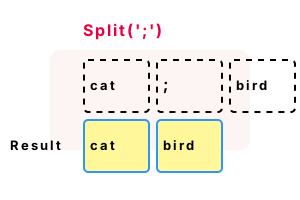
Part 1 We invoke Split() with a single character argument. The result value is a string array—it contains 2 elements.
using System;
// Contains a semicolon delimiter.
string input = "cat;bird";
Console.WriteLine($"Input: {input}");
// Part 1: split on a single character.
string[] array = input.Split(';');
// Part 2: use a foreach-loop.// ... Print each value in the array.
foreach (string value in array)
{
Console.WriteLine($"Part: {value}");
}Input: cat;bird
Part: cat
Part: bird
Multiple characters. Next we use Split() to separate a string based on multiple characters. If Split() will not compile correctly, try adding the StringSplitOptions.
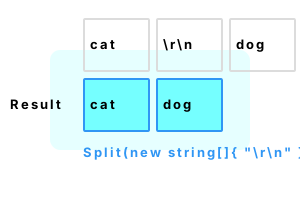
Argument 1 The first argument is the delimiter sequence. We create a string array containing one element.
Argument 2 For the second argument, we specify StringSplitOptions.None to ensure the correct method is called.
using System;
string value = "cat\r\ndog";
// Split the string on line breaks.
string[] lines = value.Split(new string[] { "\r\n" }, StringSplitOptions.None);
// Loop over the array.
foreach (string line in lines)
{
Console.WriteLine(line);
}cat
dog
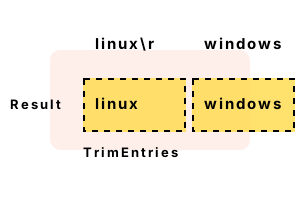
TrimEntries. Often when splitting strings, we want to eliminate some whitespace (like newlines or spaces). In .NET, we can use TrimEntries as the second argument to Split.
Warning TrimEntries can help deal with newline sequences, but it will also remove ending and leading spaces.
using System;
// Windows line break.
string value = "linux\r\nwindows";
// Split on newline, and trim resulting strings.// ... This eliminates the other whitespace sequences.
string[] lines = value.Split('\n', StringSplitOptions.TrimEntries);
for (int i = 0; i < lines.Length; i++)
{
Console.WriteLine("ITEM: [{0}]", lines[i]);
}ITEM: [linux]
ITEM: [windows]
RemoveEmptyEntries. Like TrimEntries, this is an enum argument that affects the behavior of Split. In this example, the input string contains 5 commas (delimiters).
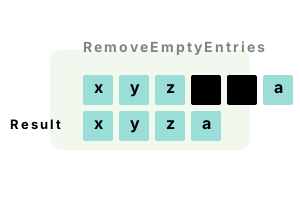
Info Two fields between commas are 0 characters long—they are empty. They are treated differently when we use RemoveEmptyEntries.
Result We specify StringSplitOptions RemoveEmptyEntries. The 2 empty fields are not in the result array.
using System;
string value = "x,y,z,,,a";
// Remove empty strings from result.
string[] array = value.Split(',', StringSplitOptions.RemoveEmptyEntries);
foreach (string entry in array)
{
Console.WriteLine(entry);
}x
y
z
a
Regex.Split, words. We can separate words with Split. Often the best way to separate words in a C# string is to use a Regex that acts upon non-word chars.
Here This example separates words in a string based on non-word characters. It eliminates punctuation and whitespace.
Tip Regex provides more power and control than the string Split methods. But the code is harder to read.
Argument 1 The first argument to Regex.Split is the string we are trying to split apart.
Argument 2 This is a Regex pattern. We can specify any character set (or range) with Regex.Split.
using System;
using System.Text.RegularExpressions;
const string sentence = "Hello, my friend";
// Split on all non-word characters.// ... This returns an array of all the words.
string[] words = Regex.Split(sentence, @"\W+");
foreach (string value in words)
{
Console.WriteLine("WORD: " + value);
}WORD: Hello
WORD: my
WORD: friend@ Special verbatim string syntax.
\W+ One or more non-word characters together.
Text files. Here we have a text file containing comma-delimited lines of values—a CSV file. We use File.ReadAllLines to read lines, but StreamReader can be used instead.
Then The program displays the values of each line after the line number. The output shows how the file was parsed into the strings.
using System;
using System.IO;
int i = 0;
foreach (string line in File.ReadAllLines("TextFile1.txt"))
{
string[] parts = line.Split(',');
foreach (string part in parts)
{
Console.WriteLine("{0}:{1}", i, part);
}
i++; // For demonstration.
}Dog,Cat,Mouse,Fish,Cow,Horse,Hyena
Programmer,Wizard,CEO,Rancher,Clerk,Farmer0:Dog
0:Cat
0:Mouse
0:Fish
0:Cow
0:Horse
0:Hyena
1:Programmer
1:Wizard
1:CEO
1:Rancher
1:Clerk
1:Farmer
Directory paths. We can split the segments in a Windows local directory into separate strings. Please note that directory paths are complex. This code may not correctly handle all cases.
Tip We could use Path DirectorySeparatorChar, a char property in System.IO, for more flexibility.
using System;
// The directory from Windows.
const string dir = @"C:\Users\Sam\Documents\Perls\Main";
// Split on directory separator.
string[] parts = dir.Split('\\');
foreach (string part in parts)
{
Console.WriteLine(part);
}C:
Users
Sam
Documents
Perls
Main
Join. With this method, we can combine separate strings with a separating delimiter. Join() can be used to round-trip data. It is the opposite of split.
Here We split a string, and then join it back together so that it is the same as the original string.
using System;
// Split apart a string, and then join the parts back together.
var first = "a b c";
var array = first.Split(' ');
var second = string.Join(" ", array);
if (first == second)
{
Console.WriteLine("OK: {0} = {1}", first, second);
}OK: a b c = a b c
Benchmark, Split. Here we test strings with 40 and 1200 chars. Speed varied on the contents of strings. The length of blocks, number of delimiters, and total size factor into performance.
Version 1 This code uses Regex.Split to separate the strings apart. It is tested on both a long string and a short string.
Version 2 This code uses the string.Split method, but with the first argument being a char array. Two chars are in the char array.
Version 3 This version uses string.Split as well, but with a string array argument.
Result On .NET 7 for Linux (in 2023), Regex.Split remains the slowest. Splitting on a char or string is faster.
using System;
using System.Diagnostics;
using System.Text.RegularExpressions;
const int _max = 100000;
// Get long string.
string value1 = string.Empty;
for (int i = 0; i < 120; i++)
{
value1 += "01234567\r\n";
}
// Get short string.
string value2 = string.Empty;
for (int i = 0; i < 10; i++)
{
value2 += "ab\r\n";
}
// Put strings in array.
string[] tests = { value1, value2 };
foreach (string test in tests)
{
Console.WriteLine("Testing length: " + test.Length);
// Version 1: use Regex.Split.
var s1 = Stopwatch.StartNew();
for (int i = 0; i < _max; i++)
{
string[] result = Regex.Split(test, "\r\n", RegexOptions.Compiled);
if (result.Length == 0)
{
return;
}
}
s1.Stop();
// Version 2: use char array split.
var s2 = Stopwatch.StartNew();
for (int i = 0; i < _max; i++)
{
string[] result = test.Split(new char[] { '\r', '\n' }, StringSplitOptions.RemoveEmptyEntries);
if (result.Length == 0)
{
return;
}
}
s2.Stop();
// Version 3: use string array split.
var s3 = Stopwatch.StartNew();
for (int i = 0; i < _max; i++)
{
string[] result = test.Split(new string[] { "\r\n" }, StringSplitOptions.None);
if (result.Length == 0)
{
return;
}
}
s3.Stop();
Console.WriteLine(((double)(s1.Elapsed.TotalMilliseconds * 1000000) / _max).ToString("0.00 ns"));
Console.WriteLine(((double)(s2.Elapsed.TotalMilliseconds * 1000000) / _max).ToString("0.00 ns"));
Console.WriteLine(((double)(s3.Elapsed.TotalMilliseconds * 1000000) / _max).ToString("0.00 ns"));
}Testing length: 1200
7546.61 ns
4483.39 ns
5632.97 ns
Testing length: 40
786.97 ns
357.58 ns
344.27 ns
Benchmark, array argument. Here we examine delimiter performance. It is worthwhile to declare, and allocate, the char array argument as a local variable.
Version 1 This code creates a new char array with 2 elements on each Split call. These must all be garbage-collected.
Version 2 This version uses a single char array, created before the loop. It reuses the cached char array each time.
Result On .NET 7, in 2023 on Linux, caching the array argument to Split() helps performance.
using System;
using System.Diagnostics;
const int _max = 10000000;
string value = "a b,c";
char[] delimiterArray = new char[] { ' ', ',' };
// Version 1: split with a new char array on each call.
var s1 = Stopwatch.StartNew();
for (int i = 0; i < _max; i++)
{
string[] result = value.Split(new char[] { ' ', ',' });
if (result.Length == 0)
{
return;
}
}
s1.Stop();
// Version 2: split using a cached char array on each call.
var s2 = Stopwatch.StartNew();
for (int i = 0; i < _max; i++)
{
string[] result = value.Split(delimiterArray);
if (result.Length == 0)
{
return;
}
}
s2.Stop();
Console.WriteLine(((double)(s1.Elapsed.TotalMilliseconds * 1000000) / _max).ToString("0.00 ns"));
Console.WriteLine(((double)(s2.Elapsed.TotalMilliseconds * 1000000) / _max).ToString("0.00 ns"));83.70 ns Split, new char[]
76.83 ns Split, existing char[]
A summary. By invoking the Split method, we separate strings. And we solve problems: split divides (separates) strings, and keeps code as simple as possible.
Dot Net Perls is a collection of tested code examples. Pages are continually updated to stay current, with code correctness a top priority.
Sam Allen is passionate about computer languages. In the past, his work has been recommended by Apple and Microsoft and he has studied computers at a selective university in the United States.
This page was last updated on Apr 20, 2023 (edit).