C# SortedList Collection

Sorted letters: A through Z

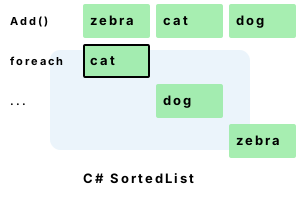
SortedList stores elements in an ordered way. It can be quickly searched with binary search. It has worse lookup performance than Dictionary collections. Its main benefit is that it allows you to use binary search with less development effort.

This C# tutorial uses the SortedList collection. It provides example code.

Example

Note

This is an overview of the methods and properties on the SortedList collection in the C# language. You can use the SortedList in the almost exact same way as a Dictionary, and its main difference is in its implementation, which may require less memory for storage but more time for lookups.

This example uses the parameterless constructor, the Add instance method, the ContainsKey and TryGetValue methods, the indexer, the enumerator, the IndexOfKey and IndexOfValue methods, and finally the Count property.

Program that uses SortedList [C#]

using System;
using System.Collections.Generic;

class Program
{
    static void Main()
    {
	//
	// Created SortedList with three keys and values.
	//
	SortedList<string, int> sorted = new SortedList<string, int>();
	sorted.Add("perls", 3);
	sorted.Add("dot", 1);
	sorted.Add("net", 2);

	//
	// Test SortedList with ContainsKey method.
	//
	bool contains1 = sorted.ContainsKey("java");
	Console.WriteLine("contains java = " + contains1);

	//
	// Use TryGetValue method.
	//
	int value;
	if (sorted.TryGetValue("perls", out value))
	{
	    Console.WriteLine("perls key is = " + value);
	}

	//
	// Use item indexer.
	//
	Console.WriteLine("dot key is = " + sorted["dot"]);

	//
	// Loop over SortedList data.
	//
	foreach (var pair in sorted)
	{
	    Console.WriteLine(pair);
	}

	//
	// Get index of key and then index of value.
	//
	int index1 = sorted.IndexOfKey("net");
	Console.WriteLine("index of net (key) = " + index1);

	int index2 = sorted.IndexOfValue(3);
	Console.WriteLine("index of 3 (value) = " + index2);

	//
	// Display Count property.
	//
	Console.WriteLine("count is = " + sorted.Count);
    }
}

Output

contains java = False
perls key is = 3
dot key is = 1
[dot, 1]
[net, 2]
[perls, 3]
index of net (key) = 1
index of 3 (value) = 2
count is = 3
Main method

Overview. A new SortedList is allocated on the managed heap. This SortedList instance has two type parameters, string and int, that describe the requirements for the method calls to the further methods. This provides compile-time checking for the validity of your program.

Steps

Add method usage. The Add method is invoked three times with two different parameters each time. The type of the variable parameters exactly matches the types embedded in the SortedList signature. You will get a compile-time error if you try to use a wrongly-typed parameter.

ContainsKey and TryGetValue. These two method calls test the internal data structure (an array) in the SortedList instance. The ContainsKey actually looks up the value completely but only returns true or false in its public signature. The TryGetValue method can be used to actually obtain the value associated with the key if it is found in the data structure. It can boost performance on lookups.

Indexer. The indexer access in the example simply uses the [ ] syntax on the instance itself. This invokes the this[key] property accessor in the type definition. You can see the actual source code from the disassembled SortedList that implements the indexer later in this document.

Indexer ExamplesForeach loop construct

Enumerating SortedList. You can loop over the SortedList instance by using a foreach-loop construct over the variable itself. This internally invokes the enumerator implementation. You can specify the KeyValuePair type on the iteration variable 'pair' instead of the implicit var type. Using the enumerator in this way usually results in the least amount of memory allocation and copying.

Final notes. The program also invokes the IndexOfKey and IndexOfValue methods on the SortedList instance. These are usually used internally on the SortedList, but can be useful for when you want to know the position of an element in the internally sorted data structure. The program finally calls the Count property, which internally simply performs a field access.

Implementation

.NET Framework information

Here we look inside a disassembled version of the SortedList generic class. This shows us exactly what the SortedList implementation does when you try to access a key with the indexer. The ContainsKey and TryGetValue methods also use almost the exact same lookup code so performance there is equivalent. You can see the IndexOfKey method is invoked each time, and then the internal array is accessed at that index. The IndexOfKey method then uses the Array.BinarySearch generic method.

Lookup implementation for SortedList [C#]

public TValue this[TKey key]
{
    get
    {
	int index = this.IndexOfKey(key);
	if (index >= 0)
	{
	    return this.values[index];
	}
	ThrowHelper.ThrowKeyNotFoundException();
	return default(TValue);
    }
}

public int IndexOfKey(TKey key)
{
    if (key == null)
    {
	ThrowHelper.ThrowArgumentNullException(ExceptionArgument.key);
    }
    int num = Array.BinarySearch<TKey>(this.keys, 0, this._size, key, this.comparer);
    if (num < 0)
    {
	return -1;
    }
    return num;
}
Dictionary illustration

Algorithmic performance. The binary search algorithm is often superior to a linear search but in the real world it rarely is as fast as a good hash computation and lookup. For this reason, the SortedList will likely degrade performance over a Dictionary in many programs. However, because it uses no excess structures as the Dictionary does, it will use less memory. On very small collections, it will not be slower.

Prefer Dictionary. Here I suggest that for large collections and collections where the size is indeterminate at compile-time and may be large, you should prefer the Dictionary collection. The HybridDictionary and SortedList collections perform very well on small data sets, but there is rarely a severe performance problem on small data sets. The Dictionary can greatly enhance performance on large data arrays.

Dictionary

Comparer performance on strings. If you are using a SortedList with string keys in your C# program, you can improve performance by specifying a StringComparer.Ordinal class as the comparison method. This instructs the SortedList to perform the much-faster ordinal string comparisons, ignoring certain globalization contexts. On some Dictionaries with random keys, this improves performance by 17%.

Dictionary StringComparer

Extra methods

Method call

Here we note some more methods you will find on the SortedList class in the C# programming language. You can see all of these members by typing in the SortedList variable identifier in Visual Studio and then pressing period. The IntelliSense feature will then display all the members for you.

TrimExcess. This method internally multiplies the number of keys in the data structure by 90% and sees if that number is still larger than the capacity. If the number of keys is too large, it then adjusts the Capacity property, which usually performs two Array.Copy invocations to resize the internal data structure. This is not often useful, because computers have so much memory these days that worrying about the arrays in a SortedList is not usually relevant.

Clear. You can call the Clear parameterless instance method to erase all the internal data structures of the SortedList in one method call. Another option is to simply reassign the variable in your program to a new, empty SortedList. This will offload the task of cleaning up the memory to the garbage collector.

KeyValuePair (Key and Value properties)

Keys and Values. The SortedList also provides a Keys property and a Value property accessor on the type. These can only be read from and not assigned to. Internally, they allocate the KeyList data structure and the ValueList data structure before returning the elements. Note that these allocations will only copy the element references and won't copy all the strings if you use that type as the key or value.

Memory Usage

Summary

The C# programming language

We looked at the SortedList type. We reviewed the methods you can use on this type and how it will store an internally sorted data structure which it then queries with a BinarySearch method. This class is not usually suited for optimal lookup performance but has other benefits that may outweigh that factor in very specific cases.

Collections
.NET