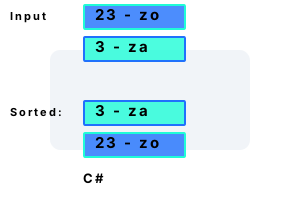
Sort number strings. Data files sometimes contain a leading integer on each line. When we want to sort these lines, we cannot use a textual sort on the strings.
Parsing values. To sort lines with numbers in them, we must take into account the numbers. We can treat numbers as numbers (not strings) by parsing them with C# code.
Required input, output. Consider this file—each line has two main parts, separated by a hyphen and some spaces. We can parse this so the lines are sorted by the left-side number.
2 - pa
2 - zo
23 - zo
3 - ad
3 - za2 - pa
2 - zo
3 - ad
3 - za
23 - zo
Example code. Each line, as it is read from there source file, is also parsed and stored into an object. The leading integer on each line is stored as an int field in the object.
And The Line object implements IComparable: in CompareTo, it first compares the integer fields and then the characters following.
using System;
using System.Collections.Generic;
using System.IO;
class Line : IComparable<Line>
{
int _number;
string _afterNumber;
string _line;
public Line(string line)
{
// Get leading integer.
int firstSpace = line.IndexOf(' ');
string integer = line.Substring(0, firstSpace);
this._number = int.Parse(integer);
// Store string.
this._afterNumber = line.Substring(firstSpace);
this._line = line;
}
public int CompareTo(Line other)
{
// First compare number.
int result1 = _number.CompareTo(other._number);
if (result1 != 0)
{
return result1;
}
// Second compare part after number.
return _afterNumber.CompareTo(other._afterNumber);
}
public override string ToString()
{
return this._line;
}
}
class Program
{
static void Main()
{
List<Line> list = new List<Line>();
using (StreamReader reader = new StreamReader("c:\\p.txt"))
{
while (true)
{
string line = reader.ReadLine();
if (line == null)
{
break;
}
list.Add(new Line(line));
}
}
list.Sort();
foreach (Line value in list)
{
Console.WriteLine(value);
}
}
}2 - pa
2 - zo
3 - ad
3 - za
23 - zo
Alphanumeric sort. A more general-purpose alphanumeric sorting algorithm would also work in this case. The alphanumeric sort would eliminate the need to parse lines on your own.
Note The solution presented above makes many things possible by actually storing the integer as a field.
Info For example, the Line objects could be used to sum all the integers on the lines or compute an average number.
Finally Further processing could be done on the lines as they are added to validate them and report possible errors in the data file.
A summary. Using an object that stores the integer as a field allows better sorting. In C# programs, implementing the IComparable interface and using a custom constructor is a solution.
Dot Net Perls is a collection of tested code examples. Pages are continually updated to stay current, with code correctness a top priority.
Sam Allen is passionate about computer languages. In the past, his work has been recommended by Apple and Microsoft and he has studied computers at a selective university in the United States.