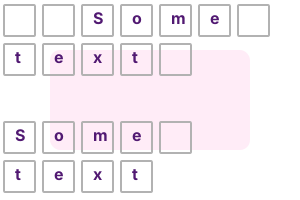
Note 2 My requirements were to trim the beginning and ending whitespace from a medium size (maybe several kilobytes) string.
using System;
using System.Text.RegularExpressions;
class Program
{
static void Main()
{
//// Example string//
string source = " Some text ";
//// Use the ^ to always match at the start of the string.// Then, look through all WHITESPACE characters with \s// Use + to look through more than 1 characters// Then replace with an empty string.//
source = Regex.Replace(source, @"^\s+", "");
//// The same as above, but with a $ on the end.// This requires that we match at the end.//
source = Regex.Replace(source, @"\s+$", "");
Console.Write("[");
Console.Write(source);
Console.WriteLine("]");
}
}[Some text]
Combined Regex. Here we look at another way you can trim strings using Regex. We combine the 2 regular expressions into one, and then use a single Regex Replace call.
Start: ^\s+
End: \s+$
Both: ^\s+|\s+$
Compiled. Compiled regexes do make a substantial performance improvement. My quick tests showed that for using two compiled regexes 1,000 times each was about 47% faster than not compiling them.
Discussion. If you need Trim with different requirements than the built-in methods, the Regex methods will be easier. If it is at all reasonable for you to use the built-in Trim, do so.
Summary. We looked at some methods of trimming the starts and ends of strings using Regex in the C# language. For many tasks, such as processing data in the background, Regex is ideal.
Dot Net Perls is a collection of tested code examples. Pages are continually updated to stay current, with code correctness a top priority.
Sam Allen is passionate about computer languages. In the past, his work has been recommended by Apple and Microsoft and he has studied computers at a selective university in the United States.
This page was last updated on Oct 28, 2021 (image).