Regex.Split, numbers. Regex.Split can extract numbers from strings. We get all the numbers that are found in a string. Ideal here is the Regex.Split method with a delimiter code.
Method notes. We describe an effective way to get all positive ints. For floating point numbers, or negative numbers, another solution will be needed.
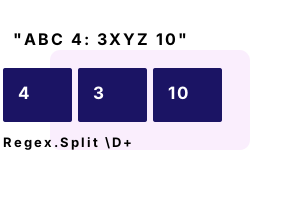
Input and output. Let us first consider the input and output of our Regex.Split call. We want to extract digit sequences of 1 or more chars. This leaves us with numbers (in a string array).
Example program. The const input string has 4 numbers in it: they are one or two digits long. To acquire the numbers, we use the format string "\D+" in the Regex.Split method.
using System;
using System.Text.RegularExpressions;
const string input = "ABC 4: 3XYZ 10";
// Split on one or more non-digit characters.
string[] numbers = Regex.Split(input, @"\D+");
foreach (string value in numbers)
{
if (!string.IsNullOrEmpty(value))
{
int i = int.Parse(value);
Console.WriteLine("Number: {0}", i);
}
}Number: 4
Number: 3
Number: 10\D Non-digit char.
+ 1 or more of char.
Notes, pattern. For handling numbers in regular expressions, the "\d" and "\D" codes are important. The lowercase "d" means digit character. The uppercase means non-digit char.
A summary. We extracted integers inside a string. And we converted the results to ints. The Regex.Split method is useful for this purpose. It allows flexible, complex delimiters.
Dot Net Perls is a collection of tested code examples. Pages are continually updated to stay current, with code correctness a top priority.
Sam Allen is passionate about computer languages. In the past, his work has been recommended by Apple and Microsoft and he has studied computers at a selective university in the United States.
This page was last updated on Oct 16, 2023 (edit).