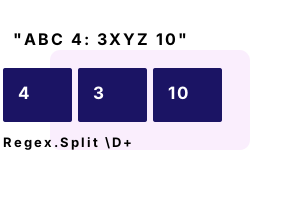
Regex.Split. This C# method separates strings based on a pattern. It handles a delimiter specified as a pattern—such as "\D+" which means non-digit characters.
Using a Regex yields a greater level of flexibility and power than string.Split. The syntax is more complicated, and performance may be worse.
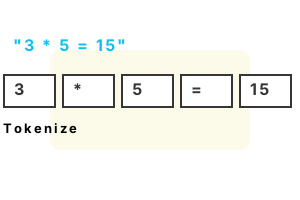
Whitespace example. Here we extract all substrings that are separated by whitespace characters. We could use string.Split. But this version is simpler and can be more easily extended.
Info The example gets all operands and operators from an equation string. An operand is a character like "*" that acts on operands.
Part 1 With Regex, we implement a simple tokenizer. Lexical analysis and tokenization is done in many programs.
Part 2 We display results. This may be an effective way to parse computer languages or program output, but it is not the fastest way.
using System;
using System.Text.RegularExpressions;
// Input string.
string operation = "3 * 5 = 15";
// Part 1: split it on whitespace sequences.
string[] operands = Regex.Split(operation, @"\s+");
// Part 2: display results.// ... Now we have each token.
foreach (string operand in operands)
{
Console.WriteLine(operand);
}3
*
5
=
15
Number example. We use Regex.Split to split on all non-digit values in the input string. We then loop through the result strings, with a foreach-loop, and use int.TryParse.
using System;
using System.Text.RegularExpressions;
// String containing numbers.
string sentence = "10 cats, 20 dogs, 40 fish and 1 programmer.";
// Get all digit sequence as strings.
string[] digits = Regex.Split(sentence, @"\D+");
// Now we have each number string.
foreach (string value in digits)
{
// Parse the value to get the number.
int number;
if (int.TryParse(value, out number))
{
Console.WriteLine(value);
}
}10
20
40
1
Uppercase. Here we get all the words that have an initial uppercase letter in a string. The Regex.Split call gets all the words. And the foreach-loop checks the first letters.
Tip It is often useful to combine regular expressions and manual looping and string operations.
using System;
using System.Collections.Generic;
using System.Text.RegularExpressions;
// String containing uppercased words.
string sentence = "Bob and Michelle are from Indiana.";
// Get all words.
string[] uppercaseWords = Regex.Split(sentence, @"\W");
// Get all uppercased words.
var list = new List<string>();
foreach (string value in uppercaseWords)
{
// Check the word.
if (!string.IsNullOrEmpty(value) && char.IsUpper(value[0]))
{
list.Add(value);
}
}
// Write all proper nouns.
foreach (var value in list)
{
Console.WriteLine(value);
}Bob
Michelle
Indiana
Benchmark, optimized method. Suppose we want to split apart the words in a string on non-word chars. An optimized method can be implemented in place of the Regex.Split method.
Version 1 The SplitWordsOptimized method is called to lowercase the string and split apart its words.
Version 2 We use ToLower and Regex.Split to lowercase and split apart the string input.
Result In .NET 5 on Linux (in 2021) the SplitWordsOptimized method is faster, but Regex has undergone significant speedups.
Warning Make sure you verify SplitWordsOptimized works correctly in your program before using it.
using System;
using System.Diagnostics;
using System.Text;
using System.Text.RegularExpressions;
class Program
{
static string[] SplitWordsOptimized(string value, bool lowercase)
{
// Count words.
int count = 0;
bool onWord = false;
for (int i = 0; i < value.Length; i++)
{
// If we are on the first char of a word, increase word count.
bool wordChar = char.IsLetterOrDigit(value[i]);
if (wordChar && !onWord)
{
onWord = true;
// Add to word.
count++;
}
// If not on word char, set bool to false.
if (!wordChar)
{
onWord = false;
}
}
// Allocate array.
string[] words = new string[count];
// Add words to array.
onWord = false;
var builder = new StringBuilder();
int wordIndex = 0;
for (int i = 0; i < value.Length; i++)
{
bool wordChar = char.IsLetterOrDigit(value[i]);
// Append to current word.
if (wordChar)
{
onWord = true;
if (lowercase)
{
builder.Append(char.ToLower(value[i]));
}
else
{
builder.Append(value[i]);
}
}
// If not on word char, set bool to false.
if ((onWord && !wordChar) ||
i == value.Length - 1)
{
onWord = false;
// Store the word, and clear the buffer.
words[wordIndex++] = builder.ToString();
builder.Clear();
}
}
return words;
}
const int _max = 1000000;
static void Main()
{
string data = "Hello, there, my-friend";
// Version 1: use SplitWordsOptimized.
var s1 = Stopwatch.StartNew();
for (int i = 0; i < _max; i++)
{
if (SplitWordsOptimized(data, true).Length != 4)
{
return;
}
}
s1.Stop();
// Version 2: use Regex.Split.
var s2 = Stopwatch.StartNew();
for (int i = 0; i < _max; i++)
{
if (Regex.Split(data.ToLower(), @"\W+").Length != 4)
{
return;
}
}
s2.Stop();
Console.WriteLine(((double)(s1.Elapsed.TotalMilliseconds * 1000000) / _max).ToString("0.00 ns"));
Console.WriteLine(((double)(s2.Elapsed.TotalMilliseconds * 1000000) / _max).ToString("0.00 ns"));
}
}525.63 ns SplitWordsOptimized
652.11 ns Regex.Split
For performance consider the string Split method (on the string type) instead of regular expressions. That method is more appropriate for precise and predictable input.
Also You can change the Regex.Split method call into an instance Regex. This enhances performance and reduces memory pressure.
Further You can use the RegexOptions.Compiled enumerated constant for greater performance.
A summary. We extracted strings with the Regex.Split method. We used patterns of non-digit characters, whitespace characters, and non-word characters.
Dot Net Perls is a collection of tested code examples. Pages are continually updated to stay current, with code correctness a top priority.
Sam Allen is passionate about computer languages. In the past, his work has been recommended by Apple and Microsoft and he has studied computers at a selective university in the United States.
This page was last updated on May 13, 2023 (simplify).