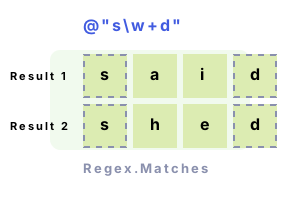
Note 2 To access the individual pieces matched by the Regex, we need to loop over the Captures collection.
Finally We can access the Value property to get the actual string. The Index property tells us the character position of the capture.
using System;
using System.Text.RegularExpressions;
class Program
{
static void Main()
{
// Input string.
const string value = @"said shed see spear spread super";
// Get a collection of matches.
MatchCollection matches = Regex.Matches(value, @"s\w+d");
// Use foreach-loop.
foreach (Match match in matches)
{
foreach (Capture capture in match.Captures)
{
Console.WriteLine("Index={0}, Value={1}", capture.Index, capture.Value);
}
}
}
}Index=0, Value=said
Index=5, Value=shed
Index=20, Value=spread
Matches, Match. With Regex.Matches, we gather a group of matches (a MatchCollection) which must be iterated over. If only one Match is needed, Regex.Match is simpler to use.
Summary. The Regex.Matches method provides a way to match multiple times in a single input string. You can then loop over these matches and their individual captures to get all the results.
Final note. Matches() is similar to Regex.Match. Doing this sort of text processing would be more cumbersome if you were to use string class methods.
Dot Net Perls is a collection of tested code examples. Pages are continually updated to stay current, with code correctness a top priority.
Sam Allen is passionate about computer languages. In the past, his work has been recommended by Apple and Microsoft and he has studied computers at a selective university in the United States.