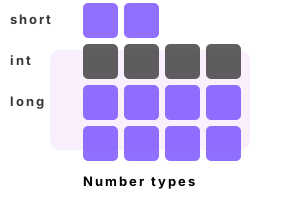
Int and uint. In computer programs, a larger, standard type (like int) is easier to access than a smaller one (like a bit). In C# int has advantages: it has optimized performance.
Int details. In C# an int is used to loop over elements in a for-loop. It is often used for local variables, and is returned from methods. The int is 4 bytes.
Int example. Here we use ints in a variety of ways, and also test their physical characteristics (memory usage). We use Console.WriteLine to write the integer to the screen.
Part 1 We declare and assign an int. It will be placed into a local variable slot in the stack memory.
Part 2 You can compare 2 integers (variables or values) using the "==" equality operator. This compares all the bits for equivalence.
Part 3 The int type also has MinValue and MaxValue properties. These are useful for when you want to loop through all integers.
using System;
// Part 1: demonstrate an int value type.
int number = 11;
Console.WriteLine(number);
number = -1; // Can be negative
Console.WriteLine(number);
// Part 2: use operators.
Console.WriteLine(number == -1);
Console.WriteLine(number + 100);
Console.WriteLine(number.GetType());
Console.WriteLine(typeof(int));
// Part 3: get minimum and maximum.
Console.WriteLine(int.MinValue);
Console.WriteLine(int.MaxValue);
// Part 4: find the memory usage for an int in an array.
long bytes1 = GC.GetTotalMemory(false);
int[] array = new int[1000 * 1000];
array[0] = 1;
long bytes2 = GC.GetTotalMemory(false);
Console.WriteLine(((bytes2 - bytes1) / (1000 * 1000)).ToString("0 bytes per int"));11
-1
True
99
System.Int32
System.Int32
-2147483648
2147483647
4 bytes per int
Minimum, maximum. Here we consider both Int32 and UInt32, the unsigned int type. With int we can go negative, but with uint we have a higher maximum.
Int arguments. We use int as a parameter. You can pass a variable or a constant to the method that uses an integer parameter. An int argument is a common type.
Info The arguments are copied to the new method whenever it is called, but this cost is reduced when functions are inlined.
Here The program shows the boolean method pattern. This can help simplify complex tests.
using System;
class Program
{
static void Main()
{
// Use integer type as argument to method.
bool result = IsOdd(1);
Console.WriteLine(result);
// Test call the method with different integers.
result = IsOdd(6);
Console.WriteLine(result);
result = IsOdd(100);
Console.WriteLine(result);
result = IsOdd(101);
Console.WriteLine(result);
}
static bool IsOdd(int number)
{
// Use the integer parameter in the method body.
return number % 2 != 0;
}
}True
False
False
True
Uint example. Uint is similar to int, but reserves no space for the sign. Unsigned integers can be used through many programs. With uint we can increase the bounds of a loop.
Detail The uint type is the same as the System.UInt32 type in the System namespace. This alias provides for clearer code in programs.
using System;
// Declare example unsigned and signed integers.
uint value1 = 100;
int value2 = 100;
// Display values.
Console.WriteLine(value1);
Console.WriteLine(value2);
// Assign the maximum values.
uint max1 = uint.MaxValue;
int max2 = int.MaxValue;
// Display maximum values.
Console.WriteLine(max1);
Console.WriteLine(max2);
// Assign the minimum values.
uint min1 = uint.MinValue;
int min2 = int.MinValue;
// Write the minimum values.
Console.WriteLine(min1);
Console.WriteLine(min2);
// Write the types.
Console.WriteLine(typeof(uint));
Console.WriteLine(typeof(int));100
100
4294967295
2147483647
0
-2147483648
System.UInt32
System.Int32
Int errors. If you try to assign an int variable in your program to a numeric literal that is too big, the C# compiler will give you a compile-time error.
So For example, try compiling code that assigns an int to 3000000000. The C# compiler will give the error here.
Tip If you change the "int" type to "uint," your program will compile successfully.
class Program
{
static void Main()
{
int value1 = 3000000000;
}
}Error CS0266
Cannot implicitly convert type 'uint' to 'int'.
An explicit conversion exists (are you missing a cast?)
Null int. An int can never be null. But we can use a nullable int, which is a struct that wraps around an int value, to represent a null int.
Info A nullable int can be tested directly against null. This makes it different from a class instance that has an int field.
using System;
class Program
{
static void Main()
{
// A nullable int can be a number, or null.
int? test = 100;
Console.WriteLine("Value is {0}", test.Value);
test = null;
Console.WriteLine("Null: {0}", test == null);
}
}Value is 100
Null: True
Int parse. Often a string contains characters that could be represented in an int variable. We can convert the string into an int with the int.Parse or int.TryParse methods.
Int performance. As a field in a class, an int requires 4 bytes. But a smaller type (byte) may be sufficient for small numbers. This may improve spatial locality.
So If your program needs to store many thousands of integers in memory, a more compact type that requires less memory would be faster.
And More compact types include the byte type, short type or ushort type. These can be packed together.
Int, short performance. Incrementing an int as a loop variable is faster than using a short or ushort (see the linked benchmark). Use int in local variables when possible.
A summary. Int is found in almost every program (uint is less common). Int is exceedingly useful and simple to understand. It can be considered the default number type.
Dot Net Perls is a collection of tested code examples. Pages are continually updated to stay current, with code correctness a top priority.
Sam Allen is passionate about computer languages. In the past, his work has been recommended by Apple and Microsoft and he has studied computers at a selective university in the United States.
This page was last updated on Apr 20, 2023 (edit).