List, initialize. A C# List can be initialized in many ways—we can call Add in a for-loop. But for more clarity, we can use the special initializer syntax.
With initializer syntax, objects inside a List can set up more easily. In modern times, .NET has advanced optimizations, so syntax here is not that important.
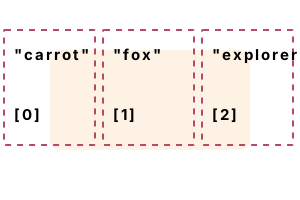
First example. The C# language has many ways to populate a List with values. Many of them are compiled into the same code. We use curly brackets and add elements in expressions.
Part 1 These first 2 declarations specify 3 strings to be added to a new List.
Part 2 Here the code copies an external array to the internal buffer of the List at runtime. This avoids unnecessary resizing.
Part 3 This code is an unclear way of initializing a List variable in the normal case. But it works.
Part 4 We can avoid a List initializer, and just create an empty list and Add() elements to it.
using System;
using System.Collections.Generic;
// Part 1: use collection initializer.// ... Use it with var keyword.
List<string> list1 = new List<string>()
{
"carrot",
"fox",
"explorer"
};
var list2 = new List<string>()
{
"carrot",
"fox",
"explorer"
};
// Part 2: use new array as parameter.
string[] array = { "carrot", "fox", "explorer" };
List<string> list3 = new List<string>(array);
// Part 3: use capacity in constructor and assign.
List<string> list4 = new List<string>(3);
list4.Add(null); // Add empty references (BAD).
list4.Add(null);
list4.Add(null);
list4[0] = "carrot"; // Assign those references.
list4[1] = "fox";
list4[2] = "explorer";
// Part 4: use Add method for each element.
List<string> list5 = new List<string>();
list5.Add("carrot");
list5.Add("fox");
list5.Add("explorer");
// Make sure they all have the same number of elements.
Console.WriteLine(list1.Count);
Console.WriteLine(list2.Count);
Console.WriteLine(list3.Count);
Console.WriteLine(list4.Count);
Console.WriteLine(list5.Count);3
3
3
3
3
Object List. You can allocate and assign the properties of objects inline with the List initialization. Object initializers and collection initializers share similar syntax.
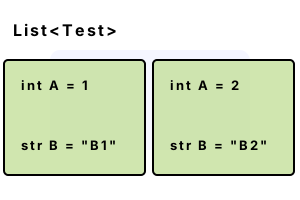
Version 1 We use a list collection initializer. In the initialization of list 1, 2 Test instances (with properties A and B) are specified.
Version 2 The object initializer syntax is used, and each object is initialized with its constructor.
Detail The 2 lists have the same contents—the same number of objects, and each object has the same properties.
using System;
using System.Collections.Generic;
class Test // Used in Lists.
{
public int A { get; set; }
public string B { get; set; }
}
class Program
{
static void Main()
{
// Version 1: initialize list with collection initializer.
List<Test> list1 = new List<Test>()
{
new Test(){ A = 1, B = "B1" },
new Test(){ A = 2, B = "B2" }
};
// Version 2: initialize list with new objects.
List<Test> list2 = new List<Test>();
list2.Add(new Test() { A = 1, B = "B1" });
list2.Add(new Test() { A = 2, B = "B2" });
// Write number of elements in the lists.
Console.WriteLine(list1.Count);
Console.WriteLine(list2.Count);
}
}2
2
Benchmark, List initializer. Here we test whether List initializers are as fast as a calling the Add method. We create 3-element lists with 2 syntax forms.
Version 1 This code uses the List initializer syntax to create a 3-element List of strings.
Version 2 This version of the code uses 3 Add() calls to populate an empty list. The Count is tested to ensure correctness.
Result In 2021 (with .NET 5 on Linux) we find that calling Add() is faster than using a collection initializer. Add() has been sped up.
using System;
using System.Collections.Generic;
using System.Diagnostics;
const int _max = 10000000;
// Version 1: use collection initializer.
var s1 = Stopwatch.StartNew();
for (int i = 0; i < _max; i++)
{
List<string> list = new List<string>()
{
"bird",
"frog",
"dog"
};
if (list.Count != 3)
{
return;
}
}
s1.Stop();
// Version 2: use Add method.
var s2 = Stopwatch.StartNew();
for (int i = 0; i < _max; i++)
{
List<string> list = new List<string>();
list.Add("bird");
list.Add("frog");
list.Add("dog");
if (list.Count != 3)
{
return;
}
}
s2.Stop();
Console.WriteLine(((double)(s1.Elapsed.TotalMilliseconds * 1000000) / _max).ToString("0.00 ns"));
Console.WriteLine(((double)(s2.Elapsed.TotalMilliseconds * 1000000) / _max).ToString("0.00 ns"));41.32 ns Collection initializer
31.58 ns Add, Add, Add
Notes, compiler. The C# compiler encounters the curly braces and turns the contents into individual Add method calls on the List. This is true for any List initializer.
Notes, IL. When examining C# programs that use collection initializers, we see extra temporary variables being created. At runtime, these excess opcodes are eliminated.
A review. Initializing many lists, we explored some specifics of List initializations. We used expression-based syntax to reduce the size of the code file.
Dot Net Perls is a collection of tested code examples. Pages are continually updated to stay current, with code correctness a top priority.
Sam Allen is passionate about computer languages. In the past, his work has been recommended by Apple and Microsoft and he has studied computers at a selective university in the United States.
This page was last updated on Apr 20, 2023 (edit).