Initialize methods. We can assign each element in an array to one value. This is often needed in programs, and the syntax is important to review.
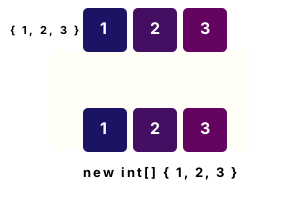
Array initializers. An array initializer uses curly brackets with elements in comma-separated lists. The length (and number of dimensions) is inferred from the expression.
Part 1 We see array initializers for one-dimensional int arrays. The first 2 array initializers are equivalent.
Part 2 We create string arrays with initializers. For array 5, we create a 2D array with 2 columns and 2 rows.
Part 3 We print the arrays to the screen. We display ranks (the number of dimensions) of the arrays.
Important Array initializers compile to the same instructions as direct assignments to populate arrays.
using System;
// Part 1: declare arrays with curly brackets.// ... It is allowed to omit the type.
int[] array1 = { 1, 2, 3 };
int[] array2 = new int[] { 1, 2, 3 };
// Part 2: use array initializations with strings.// ... We can specify two-dimensional arrays.// ... We can use empty arrays.
string[] array3 = { "dot", "net", "perls" };
string[] array4 = new string[] { "DOT", "NET", "PERLS", null };
string[,] array5 = { { "dot", "perls" }, { "framework", "4.0" } };
string[] array6 = { };
// Part 3: print the length and ranks.
Console.WriteLine("array1: {0} length", array1.Length);
Console.WriteLine("array2: {0} length", array2.Length);
Console.WriteLine("array3: {0} length", array3.Length);
Console.WriteLine("array4: {0} length", array4.Length);
Console.WriteLine("array5: {0} length, {1} rank", array5.Length, array5.Rank);
Console.WriteLine("array6: {0} length, {1} rank", array6.Length, array6.Rank);array1: 3 length
array2: 3 length
array3: 3 length
array4: 4 length
array5: 4 length, 2 rank
array6: 0 length, 1 rank
Example, for-loop. We can initialize arrays with for-loops, which (overall) may be best for a team—it uses the more standard style. We create a helper method for this purpose.
Detail We use 2 static methods, which save no state, and which receive strongly-typed arrays. The values they initialize are hard-coded.
Tip This style of code is often called list comprehension. We specify an entire array in a single declaration.
Detail Each style of code suits different developers and teams. I tend to use the more standard loop style with for.
using System;
using System.Linq;
class Program
{
static void Main()
{
// Initialize an array of -1 integers.
int[] arr1 = Enumerable.Repeat(-1, 10).ToArray();
foreach (int i in arr1)
{
Console.Write(i);
}
Console.WriteLine();
// Initialize an array of space chars.
char[] arr2 = Enumerable.Repeat(' ', 5).ToArray();
foreach (char c in arr2)
{
Console.Write(c);
}
Console.WriteLine();
}
}-1-1-1-1-1-1-1-1-1-1
Enumerable.Range. Here we use Enumerable.Range to initialize an array to an entire range of numbers or other values. This can be replaced with a loop. We include the System.Linq namespace.
using System;
using System.Linq;
class Program
{
static void Main()
{
// Initialize array of 5 sequential integers.
int[] arr1 = Enumerable.Range(5, 5).ToArray();
foreach (int i in arr1)
{
Console.WriteLine(i);
}
}
}5
6
7
8
9
Initialize, benchmark. Here we benchmark Enumerable.Repeat. This method is elegant, but if it causes a performance loss, it may be necessary to avoid it in some programs.
Version 1 This code creates a new int array with 100 elements, and then initializes each element with a for-loop.
Result Tested in 2023 with .NET 7 for Linux, Enumerable is faster than a for-loop and direct allocation.
using System;
using System.Diagnostics;
using System.Linq;
const int _max = 1000000;
// Version 1: initialize with for-loop.
var s1 = Stopwatch.StartNew();
for (int i = 0; i < _max; i++)
{
int[] array = new int[100];
for (int z = 0; z < array.Length; z++)
{
array[z] = -1;
}
}
s1.Stop();
// Version 2: use Enumerable.Repeat.
var s2 = Stopwatch.StartNew();
for (int i = 0; i < _max; i++)
{
int[] array = Enumerable.Repeat(-1, 100).ToArray();
}
s2.Stop();
Console.WriteLine(((double)(s1.Elapsed.TotalMilliseconds * 1000000) / _max).ToString("0.00 ns"));
Console.WriteLine(((double)(s2.Elapsed.TotalMilliseconds * 1000000) / _max).ToString("0.00 ns"));
}52.89 ns for-loop
36.40 ns Enumerable.Repeat, ToArray
Discussion. The C# language specification describes array initializers. We see that an array initializer is converted to a sequence of assignments into the newly-allocated arrays.
Array.CreateInstance. With this method, we can create an array based on runtime parameters. So a method can create a string or int array (for example) based on its arguments.
Note CreateInstance does not initialize the array to any special value (the default value is used). It only allocates (creates) the array.
A summary. The C# compiler can understand and infer array creations. The dimensions and the length of the arrays is inferred from the initializers.
Dot Net Perls is a collection of tested code examples. Pages are continually updated to stay current, with code correctness a top priority.
Sam Allen is passionate about computer languages. In the past, his work has been recommended by Apple and Microsoft and he has studied computers at a selective university in the United States.
This page was last updated on Feb 17, 2023 (edit).