Image output. An image can be written to the Response. This allows the image to be displayed only in certain cases. We use an ASPX page or an ASHX handler to display it.
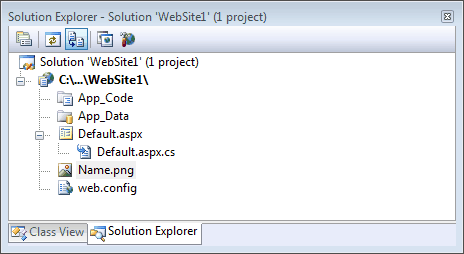
Getting started. When you use the Response.Write method in ASP.NET, it replaces the actual web forms in your ASPX page. Add an image to the root of your website project in Visual Studio.
Code-behind. Let's examine the code-behind for writing an image to the output. We must the web page where your image is located. We use a method called MapPath.
using System;
using System.Collections;
using System.Configuration;
using System.Data;
using System.Linq;
using System.Web;
using System.Web.Security;
using System.Web.UI;
using System.Web.UI.HtmlControls;
using System.Web.UI.WebControls;
using System.Web.UI.WebControls.WebParts;
using System.Xml.Linq;
public partial class _Default : System.Web.UI.Page
{
protected void Page_Load(object sender, EventArgs e)
{
string loc = Server.MapPath("~/Name.png");
Response.WriteFile(loc);
Response.ContentType = "image/png";
}
}
Page notes. The code is from default.aspx.cs—it uses Server.MapPath. Server is an intrinsic object on the Page class, and it has a method called MapPath.
And It uses a virtual path. The string "~/Name.png" indicates a file called Name.png at the root of your application.
Then Response.WriteFile is used. This method writes the contents of the file Name.png to the output. It writes the raw binary of the file.
ContentType. The code sets the ContentType property. This property tells the browser the type of the binary—this can help with some encoding errors.
Finally To test, browse to Default.aspx. The entire contents of Default.aspx are replaced with the image written to the Response.
A summary. We rendered image data to the response buffer in an ASP.NET web application. Use this kind of code for writing images to output—this code works well and is fast.
Dot Net Perls is a collection of tested code examples. Pages are continually updated to stay current, with code correctness a top priority.
Sam Allen is passionate about computer languages. In the past, his work has been recommended by Apple and Microsoft and he has studied computers at a selective university in the United States.
This page was last updated on Sep 26, 2022 (edit).