If, else. An if-statement tests for a possibility in C# programs. This statement (alongside "else") detects if an expression like "x == 10" evaluates to true.
We can improve the performance of evaluating if-statements by placing the most common case first. This may also help readability.
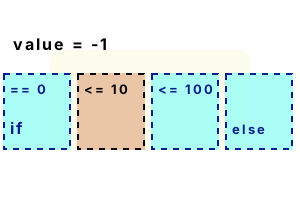
Here we consider the parts of an if-else statement. Test() uses the if-statement with two else-if blocks and one else. The order of the if-statement tests is important.
So We must test the more restrictive conditions first, or the less restrictive ones will match both cases.
Note Consider the value -1 when calling Test(). This value is not zero, but it is less than or equal to 10, so 0 is returned.
using System;
class Program
{
static void Main()
{
// Call method with embedded if-statement three times.
int result1 = Test(0);
int result2 = Test(50);
int result3 = Test(-1);
// Print results.
Console.WriteLine(result1);
Console.WriteLine(result2);
Console.WriteLine(result3);
}
static int Test(int value)
{
if (value == 0)
{
return -1;
}
else if (value <= 10)
{
return 0;
}
else if (value <= 100)
{
return 1;
}
else
{
return 2;
}
}
}-1
1
0
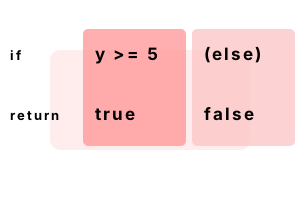
Else. We consider whether we should use a return in an else-block. Some code styles emphasize symmetry, and so the else is preferred.
Start Version "A" of the method uses a return statement (return true) at the end of an else-block.
Then The "B" method has the same result as the method A, but omits the else-block.
using System;
class Program
{
static void Main()
{
Console.WriteLine(A(5)); // Call method A.
Console.WriteLine(B(4)); // Call method B.
}
static bool A(int y)
{
if (y >= 5)
{
return true;
}
else
{
return false;
}
}
static bool B(int y)
{
if (y >= 5)
{
return true;
}
return false;
}
}True
False
Expressions. The expression in an if-statement must evaluate to true or false. A number result, or a reference type, is not accepted—a compiler error will occur. Expressions can be complex.
Tip In this program, try changing the values of A and B to 1 and 2. With those values, the if-expressions both evaluate to false.
using System;
int a = 1;
int b = 3;
// Use negated expression.
if (!(a == 1 && b == 2))
{
Console.WriteLine(true);
}
// Use binary or version.
if (a != 1 || b != 2)
{
Console.WriteLine(true);
}True
True
Brackets are not always required in C# programs. In this example, we use no curly brackets. The bodies of the if-statements are simply the following statements in the source.
Warning This style is often a bad idea. You cannot add a second line to the body of one of these if-statements.
And Some editors (Visual Studio Code for example) now insert brackets automatically.
using System;
int value = 1;
int size = 2;
if (value == 1)
if (size == 2)
Console.WriteLine("1, 2");
if (value == 0)
Console.WriteLine("0"); // Not reached.
else
Console.WriteLine("Not 0"); // Reached.
if (value == 2) Console.WriteLine("2"); // Not reached.1, 2
Not 0
Nested. Nesting if-statements will create a similar flow of control to the boolean "and" operator. The arrangement of if-statements impacts performance.
Detail These 2 methods are identical when compiled. No performance difference will exist.
Detail This version inverts the order of the checks. It is faster when "value" is greater than 100.
Note Nesting ifs can help code clarity. If other statements need to be executed, nesting can also combine logic blocks.
using System;
class Program
{
static void Main()
{
Method1(50);
Method2(50);
Method3(50);
}
static void Method1(int value)
{
if (value >= 10)
{
if (value <= 100)
{
Console.WriteLine(true);
}
}
}
static void Method2(int value)
{
if (value >= 10 &&
value <= 100)
{
Console.WriteLine(true);
}
}
static void Method3(int value)
{
if (value <= 100 &&
value >= 10)
{
Console.WriteLine(true);
}
}
}True
True
True
Error, cannot convert. The C# compiler returns a compile-time error if we try to compile this program. A variable cannot be assigned within an if-statement. This protects us from typos.
class Program
{
static void Main()
{
int i = 100;
// This does not compile!
if (i = 200)
{
System.Console.WriteLine("Zebra");
}
}
}Error CS0029
Cannot implicitly convert type 'int' to 'bool'
Warning, possible mistake. An empty statement is a valid statement to place in an else block. But this is more likely an error in programs—a misplaced semicolon.
Here We have just a semicolon in the else block. This is valid, and the else clause would be considered empty.
But This could be a typo, so the C# compiler helpfully warns us with the "possible mistaken empty statement" message.
Tip Use an empty block with brackets if you wish to have an empty else-statement—no warning will be issued.
class Program
{
static void Main()
{
int bird = 2;
if (bird == 3)
{
}
else
;
}
}Warning CS0642
Possible mistaken empty statement
Ternary. What is the ternary operator? It is like a question with two answers. It allows us to express a predicate and two consequent statements inside one statement.
Detail We use the ternary operator in UseTernary(), and the if-else statements in UseIf.
Version 1 This code uses the ternary operator in UseTernary. If the argument is 5, it returns 10, otherwise it returns 20.
Version 2 This version use the if and else statements—the end result is the same as the ternary version.
Detail The .NET Framework compiles the statements to the same branch statements in most cases (some slight differences can be present).
using System;
class Program
{
static void Main()
{
// Version 1: use ternary.
Console.WriteLine("TERNARY: " + UseTernary(5));
Console.WriteLine("TERNARY: " + UseTernary(100));
// Version 2: use if.
Console.WriteLine("IF: " + UseIf(5));
Console.WriteLine("IF: " + UseIf(100));
}
static int UseTernary(int argument)
{
return argument == 5 ?
10 :
20;
}
static int UseIf(int argument)
{
if (argument == 5)
{
return 10;
}
else
{
return 20;
}
}
}TERNARY: 10
TERNARY: 20
IF: 10
IF: 20
Null coalescing. This operator uses two question marks. Similar to ternary, it can only be used on a reference variable. It can reduce source code size.
Tip We can replace an if statement that tests against null, or a ternary statement, with a null coalescing expression.
using System;
// Use null coalescing instead of ternary or if-statements.
string value = null;
Console.WriteLine(value ?? "NO VALUE");
value = "bird";
Console.WriteLine(value ?? "NO VALUE");NO VALUE
bird
Benchmark, reorder. Suppose a value we want to test in a program is almost always 3. But 1% of the time it is not 3, so we still need to test for 2 and 1. We can test for 3 first.
Version 1 This version of the code tests for the value 3 last in a series of if-statements.
Version 2 This version tests for the value 3 first in the if-statements. It uses the reorder-if optimization.
Result Testing for the most common value first is faster. In 2021 with .NET 5, this optimization seems more helpful than ever before.
using System;
using System.Diagnostics;
class Program
{
static int Method1(int max, int testValue)
{
// Test the argument in a loop.
int result = 0;
for (int i = 0; i < max; i++)
{
if (testValue == 1)
{
result++;
}
else if (testValue == 2)
{
result--;
}
else if (testValue == 3)
{
result += 2;
}
}
return result;
}
static int Method2(int max, int testValue)
{
// Test the argument in a loop, but with most common if first.
int result = 0;
for (int i = 0; i < max; i++)
{
if (testValue == 3)
{
result += 2;
}
else if (testValue == 1)
{
result++;
}
else if (testValue == 2)
{
result--;
}
}
return result;
}
}
const int _max = 1000000;
static void Main()
{
// Version 1: if-statements in non-optimized order.
var s1 = Stopwatch.StartNew();
for (int i = 0; i < _max; i++)
{
Method1(100, 3);
}
s1.Stop();
// Version 2: most common match first (reordered ifs).
var s2 = Stopwatch.StartNew();
for (int i = 0; i < _max; i++)
{
Method2(100, 3);
}
s2.Stop();
Console.WriteLine(((double)(s1.Elapsed.TotalMilliseconds * 1000000) / _max).ToString("0.00 ns"));
Console.WriteLine(((double)(s2.Elapsed.TotalMilliseconds * 1000000) / _max).ToString("0.00 ns"));
}153.31 ns Tests 1, 2, 3 (value is 3)
64.50 ns Reordered, tests 3, 1, 2 (value is 3)
Benchmark, table. A lookup table can completely replace an if-else chain. And often this will yield a speedup. A one-to-one mapping oftest value to result is easiest to replace.
Version 1 This version of the code tests for 3 values and sets the result with if-else statements.
Version 2 This version uses a precomputed lookup table. It generates the same results as version 1.
Result Currently in 2021 on .NET 5 (for Linux) it is faster to use if-else. But this optimization could help—try it and find out.
Note Instead of an array, a Dictionary can be used as a lookup table. The lookup algorithm has a greater cost though.
using System;
using System.Diagnostics;
const int _max = 100000000;
int[] lookup = new int[] { 10, 50, 7 };
// Version 1: use if, else statements to get a single int result.
var s1 = Stopwatch.StartNew();
for (int i = 0; i < _max; i++)
{
int test = i % 3;
int result = 0;
if (test == 0)
{
result = 10;
}
else if (test == 1)
{
result = 50;
}
else if (test == 2)
{
result = 7;
}
if (result == 0)
{
break;
}
}
s1.Stop();
// Version 2: use lookup table instead of if to get a single int result.
var s2 = Stopwatch.StartNew();
for (int i = 0; i < _max; i++)
{
int test = i % 3;
int result = lookup[test];
if (result == 0)
{
break;
}
}
s2.Stop();
Console.WriteLine(((double)(s1.Elapsed.TotalMilliseconds * 1000000) / _max).ToString("0.00 ns"));
Console.WriteLine(((double)(s2.Elapsed.TotalMilliseconds * 1000000) / _max).ToString("0.00 ns"));1.18 ns if/else if/else if chain
1.43 ns lookup[test]
In reading code, earlier things are perceived as more important. So put the high-value if-checks first. With the syntax for if-statements, we direct the flow of control.
Dot Net Perls is a collection of tested code examples. Pages are continually updated to stay current, with code correctness a top priority.
Sam Allen is passionate about computer languages. In the past, his work has been recommended by Apple and Microsoft and he has studied computers at a selective university in the United States.
This page was last updated on Nov 17, 2023 (edit).