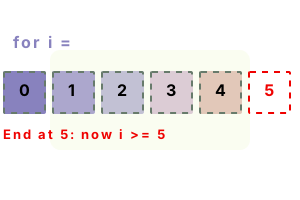
For loop. In a C# for-loop, we iterate through a series of numbers. One thing to remember is that "for" gives us an index variable, which can have other uses.
In this language, foreach is often the clearest loop. But if the index is needed (like 0, 1, 2) then "for" is better—it can check adjacent elements, or other collections.
First example. The name of the variable "i" is a convention. It is easier for other programmers to understand than unusual variable names.
Start The loop starts at the value 0. In C# most collections are zero-based, so the first element is at 0.
Next The loop continues running through the body until "i" equals 5 (or some other value if it is set elsewhere).
Important Please note the third clause in the for-loop, the i++ part. This is the iteration statement—it occurs after each pass.
using System;
for (int i = 0; i < 5; i++)
{
Console.WriteLine("ITERATION: {0}", i);
}ITERATION: 0
ITERATION: 1
ITERATION: 2
ITERATION: 3
ITERATION: 4
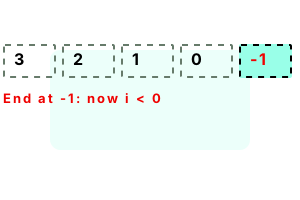
Decrement loop. Suppose we wish to go from a high number to a low number. A for-loop can decrement in the step condition. Here we start at 3, and continue until 0 is reached.
using System;
for (int i = 3; i >= 0; i--)
{
Console.WriteLine(i);
}3
2
1
0
Iteration step. The third clause in the for-loop is the step. This can change the variable (or any variable) by any amount—a constant is not even needed.
Info Here we add 2 after each pass through the loop. So we skip odd number indexes.
using System;
for (int i = 0; i < 10; i += 2)
{
Console.WriteLine(i);
}0
2
4
6
8
Decrement, step. This program revisits loop decrementing. It decreases the iteration variable by two each time. The example is simple and straightforward.
using System;
for (int i = 10 - 1; i >= 0; i -= 2)
{
Console.WriteLine(i);
}9
7
5
3
1
Expression, maximum bound. Complex expressions, even method calls, can be used in the conditions of a for-loop. This can help simplify code.
However Be careful not to call an expensive function too much. Unneeded operations can end up executing.
using System;
for (int i = 0; i < (20 / 2); i += 2)
{
Console.WriteLine(i);
}0
2
4
6
8
For parts. When a for-loop is encountered, the first of the 3 statements is executed. This example program shows us how the parts are reached in C#.
Part 1 We can start a for-loop with any value for the iteration variable. The value does not need to be a constant.
Part 2 Evaluated before the loop body is entered. If this is true, the loop proceeds. If false, it stops (the body is not entered).
Part 3 Executed after each successful iteration. Specifies how the iteration variable (i) changes.
using System;
class Program
{
static int FirstPart()
{
Console.WriteLine("[1] PART 1");
return 0;
}
static int SecondPart()
{
Console.WriteLine("[2] PART 2");
return 3;
}
static int ThirdPart()
{
Console.WriteLine("[3] PART 3");
return 1;
}
static void Main()
{
// Carefully understand how the 3 parts are called.
for (int i = FirstPart();
i < SecondPart();
i += ThirdPart())
{
Console.WriteLine("[ ] BODY");
}
}
}[1] PART 1
[2] PART 2
[ ] BODY
[3] PART 3
[2] PART 2
[ ] BODY
[3] PART 3
[2] PART 2
[ ] BODY
[3] PART 3
[2] PART 2
Empty statements. We can omit statements in the for-loop. With empty statements, we just see some semicolons. No action is taken on each iteration—this is like a while true loop.
using System;
int i = 0;
// Use for-loop with empty statements.
for (; ; )
{
if (i > 4)
{
break;
}
Console.WriteLine("EMPTY FOR-LOOP: " + i);
i++;
}EMPTY FOR-LOOP: 0
EMPTY FOR-LOOP: 1
EMPTY FOR-LOOP: 2
EMPTY FOR-LOOP: 3
EMPTY FOR-LOOP: 4
For, 2 variables. We can use 2 variables in a for-loop statement. Here we initialize "i" and "x" to zero, and increment "i" and decrement "x."
Tip We use commas to separate statements. For the termination condition, we can use 1 expression with the "and" operator.
// Loop over 2 variables at once.
for (int i = 0, x = 0; i < 10 && x >= -2; i++, x--)
{
System.Console.WriteLine("FOR: i={0}, x={1}", i, x);
}FOR: i=0, x=0
FOR: i=1, x=-1
FOR: i=2, x=-2
Chars. A for-loop often uses an int index. But other index types are possible. Here I use a char variable and loop over all the lowercase letters.
Tip Often a for-loop over chars is useful for initializing a lookup table. Each char is accessed separately.
using System;
// Loop over character range.
for (char c = 'a'; c <= 'z'; c++)
{
Console.WriteLine(c);
}a
b
c
d
e....
Strings. All kinds of loops work with strings. But the for-loop is often preferable for its syntax and index variable. Testing chars directly is fastest.
Info We can loop over a string with for and foreach in the same way. For gives us an index to use.
Here We see a simple loop through the characters in the constant string literal "Rome." All 4 are printed to the console.
string value = "Rome";
// Use for-loop from 0 through Length of string (goes to last index).
for (int i = 0; i < value.Length; i++)
{
char current = value[i];
System.Console.WriteLine(current);
}R
o
m
e
Local function, max. Suppose we need some logic to determine the max bound of a for-loop. Instead of repeating it, we can place it in a local function.
Detail The Math.Min function is sometimes useful in this situation too—it can prevent us from going off the end of an array.
using System;
class Program
{
static void Main()
{
// Use this local function to safely get a top bound for a for-loop.
int Limit(int max, int[] array)
{
return Math.Min(max, array.Length);
}
int[] values = { 10, 20, 30, 40 };
// Continue to index 2.
for (int i = 0; i < Limit(2, values); i++)
{
Console.WriteLine("LIMIT 2: " + values[i]);
}
// Continue to index 10 (or array length).
for (int i = 0; i < Limit(10, values); i++)
{
Console.WriteLine("LIMIT 10: " + values[i]);
}
}
}LIMIT 2: 10
LIMIT 2: 20
LIMIT 10: 10
LIMIT 10: 20
LIMIT 10: 30
LIMIT 10: 40
Array, for. Loop constructs can be used upon arrays. We can iterate in forward or reverse order, or access the elements in any other order we can come up with.
using System;
int[] values = { 20, -20, 30 };
for (int i = 0; i < values.Length; i++)
{
int element = values[i];
Console.WriteLine("ARRAY: {0}, {1}", i, element);
}ARRAY: 0, 20
ARRAY: 1, -20
ARRAY: 2, 30
Benchmark, jammed. Suppose we have 2 loops that iterate over the same range. If the latter ones do not depend on changes made in the earlier loops, we can merge or "jam" them.
Info We want to set 3 values in an array repeatedly. There is no data dependence between the 3 operations.
Version 1 Here we see the "jammed" loops merged into 1 loop. Each iteration acts upon 3 indexes before continuing.
Version 2 This version is the unoptimized code. We perform 3 loops to perform the operation, instead of just 1.
Result On .NET 5 (using Linux) the "jammed" loop, where we make a single pass from start to end, is measurably faster.
using System;
using System.Diagnostics;
class Program
{
const int _max = 1000000;
static void Main()
{
int[] data = new int[10];
// Version 1: use jammed loop method.
var s1 = Stopwatch.StartNew();
for (int i = 0; i < _max; i++)
{
Method1(data);
}
s1.Stop();
// Version 2: use separate loops.
var s2 = Stopwatch.StartNew();
for (int i = 0; i < _max; i++)
{
Method2(data);
}
s2.Stop();
Console.WriteLine(((double)(s1.Elapsed.TotalMilliseconds * 1000000) / _max).ToString("0.00 ns"));
Console.WriteLine(((double)(s2.Elapsed.TotalMilliseconds * 1000000) / _max).ToString("0.00 ns"));
}
static void Method1(int[] array)
{
// Use "jammed" loop.
for (int i = 0; i < array.Length; i++)
{
array[0] = i;
array[1] = i;
array[2] = i;
}
}
static void Method2(int[] array)
{
// Use 3 separate loops.
for (int i = 0; i < array.Length; i++)
{
array[0] = i;
}
for (int i = 0; i < array.Length; i++)
{
array[1] = i;
}
for (int i = 0; i < array.Length; i++)
{
array[2] = i;
}
}
}11.75 ns Jammed for-loop (1)
14.94 ns Separate for-loops (3)
Benchmark, unwinding. A loop can process just one operation at a time. But sometimes we can place 2 or more operations in an iteration. This is called loop unrolling or unwinding.
Important We must be sure to only use this when we know that the size of the loop is divisible by the number of operations.
Version 1 Here we test 1 array element per iteration. This is the simplest way to write many loops.
Version 2 In the second method, we test 2 array elements per iteration—and increment by 2. We unwind the loop.
Result With .NET 5 for Linux, acting on 2 array elements per iteration is faster. Be sure to always test this optimization.
using System;
using System.Diagnostics;
class Program
{
const int _max = 100000;
static void Main()
{
int[] data = new int[100];
// Version 1: loop over each element.
var s1 = Stopwatch.StartNew();
for (int i = 0; i < _max; i++)
{
Method1(data);
}
s1.Stop();
// Version 2: loop over 2 elements at a time (use loop unwinding).
var s2 = Stopwatch.StartNew();
for (int i = 0; i < _max; i++)
{
Method2(data);
}
s2.Stop();
Console.WriteLine(((double)(s1.Elapsed.TotalMilliseconds * 1000000) / _max).ToString("0.00 ns"));
Console.WriteLine(((double)(s2.Elapsed.TotalMilliseconds * 1000000) / _max).ToString("0.00 ns"));
}
static void Method1(int[] array)
{
// If element is 3, change it to 0.
for (int i = 0; i < array.Length; i++)
{
if (array[i] == 3)
{
array[i] = 0;
}
}
}
static void Method2(int[] array)
{
// Handle 2 elements in each iteration, and increment by 2.// ... Uses loop unwinding.
for (int i = 0; i < array.Length; i += 2)
{
if (array[i] == 3)
{
array[i] = 0;
}
if (array[i + 1] == 3)
{
array[i + 1] = 0;
}
}
}
}71.13 ns Test 1 element per iteration
64.48 ns Test 2 elements, i += 2, loop unwinding
Benchmark, decrement. Many CPUs can compare against 0 faster. We can use this to optimize a for-loop. We start at the max, decrement, and then compare against zero each iteration.
Version 1 Consider the inner loop of Method 1. We start at the max, decrement by 1, and compare against 0.
Version 2 In this method we start at 0, and continue until we reach the max—so we compare against a non-zero number each time.
Result The test-against-zero optimization makes the loop a tiny bit faster. Even when tested on a newer PC this is true.
using System;
using System.Diagnostics;
class Program
{
const int _max = 1;
static void Main()
{
// Version 1: decrement to zero.
var s1 = Stopwatch.StartNew();
for (int i = 0; i < _max; i++)
{
Method1(10, 100000000);
}
s1.Stop();
// Version 2: increment to max.
var s2 = Stopwatch.StartNew();
for (int i = 0; i < _max; i++)
{
Method2(10, 100000000);
}
s2.Stop();
Console.WriteLine( s1.Elapsed.TotalMilliseconds.ToString( "0.00 ms"));
Console.WriteLine( s2.Elapsed.TotalMilliseconds.ToString( "0.00 ms"));
}
static int Method1(int max1, int max2)
{
// Inner loop compares against 0 and decrements.
int result = 0;
for (int i = 0; i < max1; i++)
{
for (int a = max2 - 1; a >= 0; --a)
{
if (result++ > 1000)
{
result = 0;
}
}
}
return result;
}
static int Method2(int max1, int max2)
{
// Inner loop compares against max int and increments.
int result = 0;
for (int i = 0; i < max1; i++)
{
for (int a = 0; a < max2; a++)
{
if (result++ > 1000)
{
result = 0;
}
}
}
return result;
}
}556.88 ms Decrement, test against 0
558.37 ms Increment, test against max int
Summary. The for-loop is powerful and easy to write. It is many developers loop of choice. It makes a C# program feel more like the old times when developers were writing C code.
Dot Net Perls is a collection of tested code examples. Pages are continually updated to stay current, with code correctness a top priority.
Sam Allen is passionate about computer languages. In the past, his work has been recommended by Apple and Microsoft and he has studied computers at a selective university in the United States.
This page was last updated on Nov 10, 2023 (simplify).