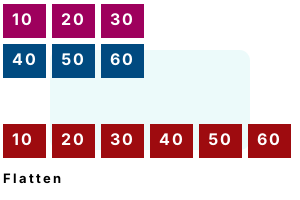
An example. We introduce the To1DArray method, which receives a 2D int array and returns a flattened form. The result is a 1D array—we will need to access its elements with an expression.
Step 1 We access the 2D array's total element count—the Length property on a 2D returns this value.
Step 2 We copy the 2D array elements into a 1D array. We loop over each dimension.
Step 3 Here we return the 1D array. To access elements with 2 indexes, we will need to multiply the first index.
using System;
class Program
{
static int[] To1DArray(int[,] input)
{
// Step 1: get total size of 2D array, and allocate 1D array.
int size = input.Length;
int[] result = new int[size];
// Step 2: copy 2D array elements into a 1D array.
int write = 0;
for (int i = 0; i <= input.GetUpperBound(0); i++)
{
for (int z = 0; z <= input.GetUpperBound(1); z++)
{
result[write++] = input[i, z];
}
}
// Step 3: return the new array.
return result;
}
static void Main()
{
int[,] elements = { { 10, 20, 30 }, { 40, 50, 60 } };
// Convert 2D array to 1D array.
int[] result = To1DArray(elements);
// Write flat array.
foreach (int value in result)
{
Console.WriteLine("ELEMENT: {0}", value);
}
}
}ELEMENT: 10
ELEMENT: 20
ELEMENT: 30
ELEMENT: 40
ELEMENT: 50
ELEMENT: 60
Index multiplication. Here we consider how to access a flattened array as a 2D array. You multiply the first coordinate by the width, and then add the second coordinate.
Note To use a jagged array, you must have an array of references to arrays. 2D arrays have significant performance penalties.
Detail This code creates, assigns to and finally displays a 2D array and its equivalent flattened array.
using System;
class Program
{
static void Main()
{
while (true)
{
Console.WriteLine("Enter height: [4+]");
int height = int.Parse(Console.ReadLine());
Console.WriteLine("Enter width: [10+]");
int width = int.Parse(Console.ReadLine());
//// TWO-DIMENSIONAL ARRAY//
int[,] twoDimensional = new int[height, width];
// Assign cell 1, 6
twoDimensional[1, 6] = 5;
// Assign cell 3, 9
twoDimensional[3, 9] = 9;
// Assign cell at 2, 3
twoDimensional[2, 3] = 1;
// Display
for (int i = 0; i < height; i++)
{
for (int a = 0; a < width; a++)
{
Console.Write(twoDimensional[i, a]);
}
Console.WriteLine();
}
Console.WriteLine();
//// FLATTENED ARRAY//
int[] oneDimensional = new int[width * height];
// Assign cell 1, 6
oneDimensional[1 * width + 6] = 5;
// Assign cell 3, 9
oneDimensional[3 * width + 9] = 9;
// Assign cell at 2, 3
oneDimensional[2 * width + 3] = 1;
// Display
for (int i = 0; i < height; i++)
{
for (int a = 0; a < width; a++)
{
Console.Write(oneDimensional[i * width + a]);
}
Console.WriteLine();
}
}
}
}
Notes, output. The example has some complexity. We see some output from the program that demonstrates how the multiplication results in correct output.
Enter height: [4+]
4
Enter width: [10+]
10
0000000000
0000005000
0001000000
0000000009
0000000000
0000005000
0001000000
0000000009
Enter height: [4+]
5
Enter width: [10+]
15
000000000000000
000000500000000
000100000000000
000000000900000
000000000000000
000000000000000
000000500000000
000100000000000
000000000900000
000000000000000
Enter height: [4+]
6
Enter width: [10+]
12
000000000000
000000500000
000100000000
000000000900
000000000000
000000000000
000000000000
000000500000
000100000000
000000000900
000000000000
000000000000
Notes, array access. Suppose we want to change the accesses of a 2D array into flattened, 1D array accesses. We can change them as shown in this table.
FLATTENED ARRAY:
array[(Y coordinate * width) + X coordinate]2D ARRAY:
array[Y coordinate, X coordinate]
A summary. We can create, assign values to, and display flattened arrays. This is useful for performance, memory reduction, and interoperability with other systems.
Summary, continued. In every application I have applied this technique, performance has improved. Flattened arrays are ideal for hashtable buckets as well as tree structures.
Dot Net Perls is a collection of tested code examples. Pages are continually updated to stay current, with code correctness a top priority.
Sam Allen is passionate about computer languages. In the past, his work has been recommended by Apple and Microsoft and he has studied computers at a selective university in the United States.
This page was last updated on Oct 26, 2022 (edit).