Directives. In C#, directives influence what code is compiled, and how it is compiled. We can perform conditional compilation based on symbols.
With syntax like #define, directives can add or remove lines of code, without affecting runtime. Many programs can reside in one. Things become complex.
Define, if. First, this program defines 3 symbols in the initial #define directives. The NET symbol is then undefined. In Main, we can see that the #if PERLS block is compiled.
Info The goal of this program is to demonstrate the #if, #elif, and #endif syntax.
Tip You can use "or" and "and" operators. You can negate a symbol, such as with !NET, and this inverts its Boolean value.
#define PERLS#define PYTHONS#define NET#undef NET
using System;
class Program
{
static void Main()
{
#if PERLS
Console.WriteLine("PERLS"); // Compiled.#endif#if DOT || NET
Console.WriteLine("DOT OR NET"); // Skipped.#elif PYTHONS
Console.WriteLine("PYTHONS"); // Compiled.#endif#if (PERLS || PYTHONS) && !NET
Console.WriteLine("PERLS OR PYTHONS"); // Compiled.#endif
}
}PERLS
PYTHONS
PERLS OR PYTHONS
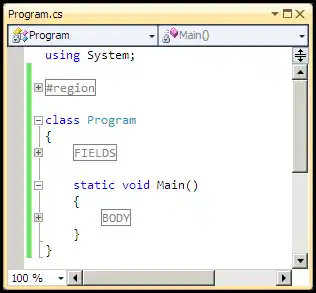
Region. This directive organizes code. We create named "regions" of code, terminated with endregion. We can then collapse these regions in Visual Studio.
Warning Other organizational constructs are often better. For example, consider using extra classes or methods to break up your code.
Info Please pay attention to the #region and #endregion directives. These are balanced throughout the source file.
Tip You can optionally specify an identifier for the region, such as with #region FIELDS.
And When you compile this program, the #region directives do not affect the intermediate language output.
using System;
#region
class Example
{
}
#endregion
class Program
{
#region FIELDS
int _field1;
int _field2;
#endregion
static void Main()
{
#region BODY
Console.WriteLine("Hello world!");
Console.WriteLine("How are you today?");
#endregion
}
}Hello world!
How are you today?
Else. This example shows that #else is conceptually equivalent to an #elif with no condition. The #else directive is similar to an else-statement.
using System;
class Program
{
static void Main()
{
#if false
Console.WriteLine(0);
#else
Console.WriteLine(1);
#endif
}
}1
Warning, error. The warning and error directives make the compiler complain. This is helpful when generating code—you can force an error to occur if the code is somehow incorrect.
#warning Bad program
class Program
{
static void Main()
{
#error Don't compile this
}
}.../Program.cs(1,10): warning CS1030: #warning: 'Bad program' [...]
.../Program.cs(7,8): error CS1029: #error: 'Don't compile this' [...]
The build failed. Fix the build errors and run again.
Line. The line directive influences warnings and errors. The compiler will report line numbers based on your custom line directive.
Note The first #line usage specifies an integer after #line. This changes the line number of the line immediately following the directive.
Also The #line default command is used. This changes the line numbers to how they would be if no #line directives were present.
Tip The #line hidden command is used—this removes all line number information.
using System;
class Program
{
static void Main()
{
#line 999
throw new Exception();
#line default
throw new Exception();
#line hidden
throw new Exception();
}
}(Comment out first two exceptions to skip them.)
Unhandled Exception: ...Program.cs:line 999
Unhandled Exception: ...Program.cs:line 10
Unhandled Exception: ...Program.cs:line 0
Define, undef. Here we define the symbol B, then the symbol A, then undefine the symbol B. The program will compile with A being defined, and B being undefined.
Note In the code, the #undef B cancels out the #define B directive, leaving B not defined.
Note 2 The undef directive is the opposite of the define directive. It doesn't matter if the symbol was never defined in the first place.
Note 3 The #if directive is evaluated at preprocessing time. It works in a similar way as the if-statement in the C# language itself.
Note 4 The #elif directive is the same as #if, except it must follow an #if or other #elif. The #else directive is the default case.
Finally The #endif directive serves to terminate the #if #elif or #if #else directive structures.
// Define B, then define A.// ... You can use undef at the top here too.// ... Try changing A to C.#define B#define A#undef B
using System;
class Program
{
static void Main()
{
// Use an if/elif/endif construct.#if A
Console.WriteLine("a");
#elif B
Console.WriteLine("b");
#elif C
Console.WriteLine("c");
#endif// Use an if/else/endif construct.#if A
Console.WriteLine("a2");
#else
Console.WriteLine("!a2");
#endif
}
}a
a2
Pragma. The default compilation settings in Visual Studio are usually fine. But with pragma, you can adjust them. You can make some warnings disappear.
So If you know about a warning and it just annoys you, pragma can help. Sometimes this helps with an unused code warning.
Here In this example, the if (false) statement results in unreachable code—the compiler will warn about this.
Tip By wrapping the #pragma warning disable directive and #pragma warning restore directive around the statement, we can hide the warning.
using System;
class Program
{
static void Main()
{
// This example has unreachable code!// ... The pragma directives hide the warning.#pragma warning disable
if (false)
{
Console.WriteLine("Perls");
}
#pragma warning restore
}
}
Many useful directives exist in the C# language. Directives, along with comments, have no effect on program runtime. They instead change how a program text is compiled.
Dot Net Perls is a collection of tested code examples. Pages are continually updated to stay current, with code correctness a top priority.
Sam Allen is passionate about computer languages. In the past, his work has been recommended by Apple and Microsoft and he has studied computers at a selective university in the United States.
This page was last updated on Jul 27, 2023 (new example).