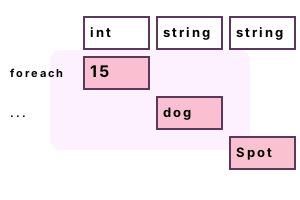
Looping notes. The DataTable class allows the use of the foreach-loop and its enumerator. But iterating over the items in a DataRow can be confusing.
An example. We use 2 public instance properties. These are Rows, which returns a typed collection of rows, and ItemArray, which returns a collection of cell values boxed in objects.
using System;
using System.Data;
class Program
{
static void Main()
{
DataTable table = GetTable();
foreach (DataRow row in table.Rows)
{
foreach (var item in row.ItemArray)
{
Console.WriteLine(item);
}
}
}
static DataTable GetTable()
{
DataTable table = new DataTable();
table.Columns.Add("Size", typeof(int));
table.Columns.Add("Category", typeof(string));
table.Columns.Add("Name", typeof(string));
table.Columns.Add("Date", typeof(DateTime));
// Use 1 row for simplicity.
table.Rows.Add(15, "dog", "Spot", DateTime.Now);
return table;
}
}Item: 15
Item: dog
Item: Spot
Item: 11/3/2020 5:33:27 AM
Field foreach. You can also use the generic Field method that receives one type parameter. We can loop over Rows with foreach, and then use Field to get each cell.
using System;
using System.Data;
class Program
{
static void Main()
{
DataTable table = GetTable();
foreach (DataRow row in table.Rows)
{
var field1 = row.Field<int>(0);
var field2 = row.Field<string>(1);
var field3 = row.Field<string>(2);
var field4 = row.Field<DateTime>(3);
Console.WriteLine("{0} {1} {2} [{3}]", field1, field2, field3, field4);
}
}
static DataTable GetTable()
{
DataTable table = new DataTable();
table.Columns.Add("Size", typeof(int));
table.Columns.Add("Category", typeof(string));
table.Columns.Add("Name", typeof(string));
table.Columns.Add("Date", typeof(DateTime));
table.Rows.Add(15, "dog", "Spot", DateTime.Now);
return table;
}
}15 dog Spot [11/3/2020 5:38:29 AM]
A summary. We examined foreach, Rows and ItemArray on the DataTable object. We can display and save all cell values in the DataTable at any time.
Dot Net Perls is a collection of tested code examples. Pages are continually updated to stay current, with code correctness a top priority.
Sam Allen is passionate about computer languages. In the past, his work has been recommended by Apple and Microsoft and he has studied computers at a selective university in the United States.