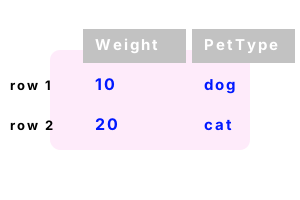
DataRow. In C# a DataTable has columns, and it has rows. Each cell in a row contains a unit of information. Its type is determined by its column.
Class details. In System.Data, we access the DataRow class. Often we use this class when looping over or accessing a DataTable. These classes drive data programs.
Add. With a DataTable, we usually need to add DataRows. This example method shows how to first add DataColumns. It adds 2 DataRows with the fields indicated in those columns.
Detail This is a separate class. One is added when we invoke Columns.Add on a DataTable. This is confusing at first.
Detail The DataTable is populated with 2 rows, each a separate pet with 2 data cells.
Detail Rows (a DataRowCollection) has an Add method that receives an object array. The array must have the expected number of elements.
using System;
using System.Data;
class Program
{
static void Main()
{
var table = GetTable();
Console.WriteLine("DONE");
}
static DataTable GetTable()
{
DataTable table = new DataTable();
table.Columns.Add("Weight", typeof(int));
table.Columns.Add("PetType", typeof(string));
// Add rows.
table.Rows.Add(10, "dog");
table.Rows.Add(20, "cat");
return table;
}
}DONE
Object array. We create an object array to add to the DataRowCollection on DataTable. This helps when we need to construct the values in code, or pass the arrays around in methods.
Note The object array here has an array Length equal to the number of columns. Object arrays can store any element type.
using System;
using System.Data;
class Program
{
static void Main()
{
DataTable table = GetTable();
//// We can instantiate a new object array and add it as a row.//
object[] array = new object[4];
array[0] = 7;
array[1] = "Candy";
array[2] = "Yorkshire Terrier";
array[3] = DateTime.Now;
table.Rows.Add(array);
}
static DataTable GetTable()
{
// Here we create a DataTable with four columns.
DataTable table = new DataTable();
table.Columns.Add("Weight", typeof(int));
table.Columns.Add("Name", typeof(string));
table.Columns.Add("Breed", typeof(string));
table.Columns.Add("Date", typeof(DateTime));
// Here we add five DataRows.
table.Rows.Add(57, "Koko", "Shar Pei", DateTime.Now);
table.Rows.Add(130, "Fido", "Bullmastiff", DateTime.Now);
table.Rows.Add(92, "Alex", "Anatolian Shepherd Dog", DateTime.Now);
table.Rows.Add(25, "Charles", "Cavalier King Charles Spaniel", DateTime.Now);
table.Rows.Add(7, "Candy", "Yorkshire Terrier", DateTime.Now);
return table;
}
}
Get DataRow. Sometimes we need to obtain a reference to a DataRow. This reference can be used for calling Delete() or other methods, or for passing it as a parameter to methods.
Here We use the Rows indexer, Rows[0], to get the first row. We get the last row in the Rows collection by subtracting 1 from the Count.
using System;
using System.Data;
class Program
{
static void Main()
{
//// Get the first row from the DataTable.//
DataTable table = GetTable();
DataRow row = table.Rows[0];
Console.WriteLine(row["Breed"]);
//// Get the last row in the DataTable.//
DataRow last = table.Rows[table.Rows.Count - 1];
Console.WriteLine(last["Breed"]);
}
}Shar Pei
Yorkshire Terrier
Loop. Every DataRow will contain cells or fields. We often need to examine these values. Here we access the ItemArray on a DataRow, and then test each field in that row.
using System;
using System.Data;
class Program
{
static void Main()
{
//// Get the first row and loop over its ItemArray.//
DataTable table = GetTable();
DataRow row = table.Rows[0];
foreach (object item in row.ItemArray)
{
if (item is int)
{
Console.WriteLine("Int: {0}", item);
}
else if (item is string)
{
Console.WriteLine("String: {0}", item);
}
else if (item is DateTime)
{
Console.WriteLine("DateTime: {0}", item);
}
}
}
}Int: 57
String: Koko
String: Shar Pei
DateTime: 4/6/2009 4:10:31 PM
Remove. There are Remove and RemoveAt methods on the DataRow collection. These work differently, but in both cases you must be certain (after removal) that you are accessing valid data.
Next We remove the first row using Remove. If we try to access the DataRow, the runtime will throw an exception.
Important Please remember that the exceptions are there to help you debug your program quicker.
using System;
using System.Data;
class Program
{
static void Main()
{
//// Get the first row for the DataTable//
DataTable table = GetTable();
//// Get the row and remove it.//
DataRow row = table.Rows[0];
table.Rows.Remove(row);
//// You can no longer access row[0].//
}
}System.Data.RowNotInTableException:
This row has been removed from a table and does not have any data.
BeginEdit() will allow creation of new data in this row.
Delete. This will cleanly delete a DataRow. When you try to access that row's index, you will get the next row. The DataRow erases the row. You cannot access it all after you call Delete.
using System;
using System.Data;
class Program
{
static void Main()
{
//// Get the first row for the DataTable//
DataTable table = GetTable();
DataRow row = table.Rows[0];
//// Delete the first row.// ... This means the second row is the first row.//
row.Delete();
//// Display the new first row.//
row = table.Rows[0];
Console.WriteLine(row["Name"]);
}
}Fido
Field. There is a Field generic method on DataRow that returns strongly-typed fields without any casting. This provides clearer code and exploits the power of generic collections.
Detail The type parameter, in sharp brackets, accepts the field type, while the function parameter accepts the field index.
A summary. DataRow is a powerful collection in System.Data. It can help your data-driven program and keep its code understandable.
Linked to DataTable. The DataRow is used in almost every program that also uses the DataTable type. For many programs, a List or Dictionary is a better choice.
Dot Net Perls is a collection of tested code examples. Pages are continually updated to stay current, with code correctness a top priority.
Sam Allen is passionate about computer languages. In the past, his work has been recommended by Apple and Microsoft and he has studied computers at a selective university in the United States.
This page was last updated on Aug 23, 2021 (edit).