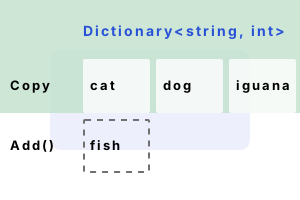
Copy Dictionary. The C# Dictionary has a copy constructor. When you pass an existing Dictionary to its constructor, it is copied. This is an effective way to copy a Dictionary's data.
When the original Dictionary is modified, the copy is not affected. Once copied, a Dictionary has separate memory locations to the original.
using System;
using System.Collections.Generic;
Dictionary<string, int> dictionary = new Dictionary<string, int>();
dictionary.Add("cat", 1);
dictionary.Add("dog", 3);
dictionary.Add("iguana", 5);
// Part 1: copy the Dictionary to a second object.
Dictionary<string, int> copy = new Dictionary<string, int>(dictionary);
// Part 2: change the first Dictionary.
dictionary.Add("fish", 4);
// Part 3: display the 2 Dictionaries.
Console.WriteLine("--- Dictionary 1 ---");
foreach (var pair in dictionary)
{
Console.WriteLine(pair);
}
Console.WriteLine("--- Dictionary 2 ---");
foreach (var pair in copy)
{
Console.WriteLine(pair);
}--- Dictionary 1 ---
[cat, 1]
[dog, 3]
[iguana, 5]
[fish, 4]
--- Dictionary 2 ---
[cat, 1]
[dog, 3]
[iguana, 5]
Internals. The Dictionary constructor that accepts IDictionary is implemented with this loop. My research established that the foreach-loop is fast and eliminates lookups.
foreach (KeyValuePair<TKey, TValue> pair in dictionary)
{
this.Add(pair.Key, pair.Value);
}
A summary. In C# we copied an entire Dictionary to a new Dictionary. As Dictionary does not define a Copy or CopyTo method, the copy constructor is the easiest way.
Dot Net Perls is a collection of tested code examples. Pages are continually updated to stay current, with code correctness a top priority.
Sam Allen is passionate about computer languages. In the past, his work has been recommended by Apple and Microsoft and he has studied computers at a selective university in the United States.
This page was last updated on Nov 27, 2023 (edit).