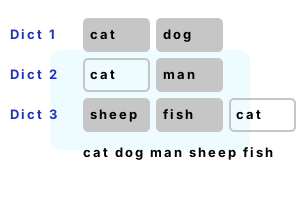
Combine Dictionary keys. Sometimes in C# programs we want to combine the keys of 2 Dictionaries. We can even union all the keys in several Dictionaries.
Method result. HashSet yields a collection of every key in the Dictionaries that we can display. We use the HashSet class for the best results.
Part 1 We populate dictionaries with strings. The approach in this article would work on Dictionaries with any value type.
Part 2 A new HashSet is created from the Keys. This HashSet is unioned on the other 2 Dictionary Keys properties.
Part 3 We display the keys directly from the HashSet—this is the collection group of keys.
using System;
using System.Collections.Generic;
// Part 1: create dictionaries.
Dictionary<string, int> d1 = new Dictionary<string, int>();
d1.Add("cat", 1);
d1.Add("dog", 2);
Dictionary<string, int> d2 = new Dictionary<string, int>();
d2.Add("cat", 3);
d2.Add("man", 4);
Dictionary<string, int> d3 = new Dictionary<string, int>();
d3.Add("sheep", 5);
d3.Add("fish", 6);
d3.Add("cat", 7);
// Part 2: get union of all keys.
HashSet<string> h1 = new HashSet<string>(d1.Keys);
h1.UnionWith(d2.Keys);
h1.UnionWith(d3.Keys);
// Part 3: display all the keys.// ... You can look up the values in the loop body.
foreach (string k in h1)
{
Console.WriteLine(k);
}cat
dog
man
sheep
fish
A discussion. This code is fairly fast, but the performance has not been extensively tested. What the code does is clear. The UnionWith has a known effect.
Notes, built-in methods. Often we can solve a problem in C# with custom looping code. But built-in methods, like UnionWith on HashSet, tend to be more maintainable.
And If you didn't use HashSet, you would have to write more code. You could refactor the HashSet code into a method.
A summary. We use Hash Set with Dictionary keys to combine collections and find the union of the keys. HashSet has the ideal logic here.
Dot Net Perls is a collection of tested code examples. Pages are continually updated to stay current, with code correctness a top priority.
Sam Allen is passionate about computer languages. In the past, his work has been recommended by Apple and Microsoft and he has studied computers at a selective university in the United States.
This page was last updated on Oct 10, 2023 (edit).