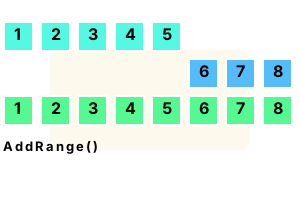
Part 4 We loop over the resulting integer array by using a foreach-loop and calling Console.WriteLine.
using System;
using System.Collections.Generic;
// Part 1: declare 2 integer arrays.
int[] array1 = { 1, 2, 3, 4, 5 };
int[] array2 = { 6, 7, 8 };
// Part 2: create new List of integers and call AddRange twice.
var list = new List<int>();
list.AddRange(array1);
list.AddRange(array2);
// Part 3: call ToArray to convert List to array.
int[] array3 = list.ToArray();
// Part 4: loop through array elements of combined array and print them.
foreach (int element in array3)
{
Console.WriteLine(element);
}1
2
3
4
5
6
7
8
Array.Copy. This example program shows how to use Array.Copy to combine arrays. This is more efficient than the List approach. It only requires a new array.
Here We merge two 3-element int arrays. We BlockCopy the first into the "final" array, and then BlockCopy the second.
Tip This version would be the fastest one according to my previous benchmarks of BlockCopy.
using System;
// ... Two input arrays.
int[] array = { 1, 2, 3 };
int[] array2 = { 4, 5, 6 };
// ... Destination array.
int[] final = new int[array.Length + array2.Length];
// ... Copy first array.
Buffer.BlockCopy(array,
0,
final,
0,
array.Length * sizeof(int));
// ... Copy second.// Note the starting offset.
Buffer.BlockCopy(array2,
0,
final,
array.Length * sizeof(int),
array2.Length * sizeof(int));
// ... Display.
foreach (int value in final)
{
Console.WriteLine(value);
}1
2
3
4
5
6
AddRange, internals. Here we discuss the internal implementation of the AddRange() method. The AddRange method internally calls InsertRange.
And It calls the fast Array.Copy method to do a bitwise copy. If you call Array.Copy manually, you could improve performance.
Summary. With AddRange on the List we can combine arrays. This method will also work with more than 2 arrays. The arrays must all have the same type of elements.
Dot Net Perls is a collection of tested code examples. Pages are continually updated to stay current, with code correctness a top priority.
Sam Allen is passionate about computer languages. In the past, his work has been recommended by Apple and Microsoft and he has studied computers at a selective university in the United States.
This page was last updated on Oct 25, 2023 (edit).