A char must be cast when converting to an integer. With an indexer, we access chars in strings. Chars can be incremented in a loop.
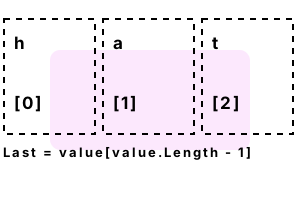
Get char. We access a char from "hat." The char at index 0 is the lowercase letter "h." Strings are indexed starting at zero—this is important. We store the char in a local variable.
Also We test the value of the char variable in an if-statement. Please notice how a char uses single-quotes around it.
using System;
// Get char at first index.
char value = "hat"[0];
// If it equals "h" then print something.
if (value == 'h')
{
Console.WriteLine(value);
}h
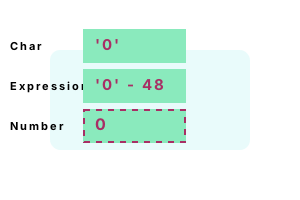
Digits example. The character "1" is equal to the value 49. It is the second digit, and the "0" is 48. We can exploit this in a C# program by subtracting 48 to go from char to int.
And We can parse a string containing digits and immediately use math on these values. This can speed up some programs.
using System;
// Convert char values to equivalent ints.
string values = "1234";
for (int i = 0; i < values.Length; i++)
{
int convertedDigit = values[i] - 48;
Console.WriteLine($"Char: {values[i]}; Digit: {convertedDigit}");
}Char: 1; Digit: 1
Char: 2; Digit: 2
Char: 3; Digit: 3
Char: 4; Digit: 4
Memory usage. This program performs some operations on a char variable after initializing it to the lowercase letter "a." The lowercase "a" is equal to the integer value 97 in ASCII.
Info The program casts the char value to an int value and displays it. This is useful for indexing arrays with characters.
Next We compare the char to another variable. We then obtain its managed Type pointer.
using System;
//// Declare a character and test in certain ways.//
char value = 'a';
Console.WriteLine(value);
Console.WriteLine((int)value);
Console.WriteLine(value == 'y');
Console.WriteLine(value.GetType());
Console.WriteLine(typeof(char));
Console.WriteLine((int)char.MinValue);
Console.WriteLine((int)char.MaxValue);
//// Determine the memory usage for a single char.//
long bytes1 = GC.GetTotalMemory(false);
char[] array = new char[1000 * 1000];
array[0] = 'a';
long bytes2 = GC.GetTotalMemory(false);
Console.WriteLine(bytes1);
Console.WriteLine(bytes2);
Console.WriteLine(((bytes2 - bytes1) / (1000 * 1000)).ToString() + " bytes per char");a
97 (Integer value of char)
False
System.Char
System.Char
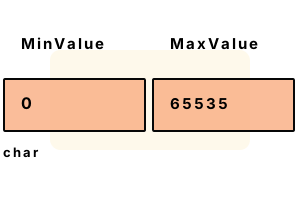
0 (MinValue as an integer)
65535 (MaxValue as an integer)
29252 (Memory measurement 1)
2029284 (Memory measurement 2)
2 bytes per char
Loop, char range. Look at this program—it is pretty exciting. It loops over the lowercase ASCII range from "a" to "z." These chars have integer forms, so can be incremented.
using System;
// Loop over all lowercase letters.
for (char c = 'a'; c <= 'z'; c++)
{
Console.Write(c);
Console.Write(' ');
}a b c d e f g h i j k l m n o p q r s t u v w x y z
Convert int to char. Sometimes we have an int and wish to convert it into its equivalent char. We can place the char in a char array, which can be turned into a string.
Part 1 We loop over the numbers 97 through 99. We cast from an int to a char—this is required, as an int is larger than a char.
using System;
char[] array = new char[100];
int write = 0;
// Part 1: convert 3 ints to chars, and place them into the array.
for (int i = 97; i < 100; i++)
{
array[write++] = (char)i;
}
// Part 2: convert array to string, and print it.
Console.WriteLine("RESULT: {0}", new string(array, 0, write));RESULT: abc
Char.IsControl. Certain characters do not represent a letter. Instead a char can represent a vertical space or even a beep. IsControl detects these chars.
Note The char.IsControl method returns true or false depending on if the character is a non-printing character.
Result We see the control characters in the character set in the char type are equal to the decimal representations of 0-31, and 127-159.
Detail The characters "\r" and "\n" are equal to 13 and 10, and these are shown to be control characters.
using System;
// Loop through all possible char values and test for control.
for (int i = 0; i < char.MaxValue; i++)
{
char c = (char)i;
if (char.IsControl(c))
{
Console.WriteLine("Is control: {0}", i);
}
}
// See if carriage return is a control character.
Console.WriteLine("Is control: {0}", char.IsControl("\r\n", 0));Is control: 0
Is control: 1
Is control: 2
Is control: 3
Is control: 4
Is control: 5
Is control: 6
Is control: 7
Is control: 8
Is control: 9
Is control: 10
Is control: 11
Is control: 12
Is control: 13
Is control: 14
Is control: 15
Is control: 16
Is control: 17
Is control: 18
Is control: 19
Is control: 20
Is control: 21
Is control: 22
Is control: 23
Is control: 24
Is control: 25
Is control: 26
Is control: 27
Is control: 28
Is control: 29
Is control: 30
Is control: 31
Is control: 127
Is control: 128
Is control: 129
Is control: 130
Is control: 131
Is control: 132
Is control: 133
Is control: 134
Is control: 135
Is control: 136
Is control: 137
Is control: 138
Is control: 139
Is control: 140
Is control: 141
Is control: 142
Is control: 143
Is control: 144
Is control: 145
Is control: 146
Is control: 147
Is control: 148
Is control: 149
Is control: 150
Is control: 151
Is control: 152
Is control: 153
Is control: 154
Is control: 155
Is control: 156
Is control: 157
Is control: 158
Is control: 159
Is control: True
Char.IsLetterOrDigit. This method tests a char. It determines if the char is a letter or digit. We loop over the characters in an example string to learn about its results.
Here The letters and digits, but not the spaces, hyphen and other punctuation received a true value from IsLetterOrDigit.
using System;
string input = "dot net perls 867-5309?!";
Console.WriteLine(input);
foreach (char letter in input)
{
bool isLetterOrDigit = char.IsLetterOrDigit(letter);
if (isLetterOrDigit)
{
Console.Write('^');
}
else
{
Console.Write(' ');
}
}
Console.WriteLine();dot net perls 867-5309?!
^^^ ^^^ ^^^^^ ^^^ ^^^^
Char.IsPunctuation. The char.IsPunctuation method matches periods, commas and other similar characters. It matches punctuation characters that are found in Unicode.
Here We loop over an example string, and call IsPunctuation on each character. The commas, and question marks, are considered punctuation.
using System;
string test = "Hello, friend, how are you?";
// Loop over the chars, and display each punctuation character.
foreach (char value in test)
{
if (char.IsPunctuation(value))
{
Console.WriteLine("ISPUNCTUATION: {0}", value);
}
}ISPUNCTUATION: ,
ISPUNCTUATION: ,
ISPUNCTUATION: ?
Char.IsSeparator. What does the char.IsSeparator method do? IsSeparator refers to the Unicode concept of separator characters, which separate words.
Return IsSeparator returns whether or not the char is a separator. A space is a separator, but a period is not considered one.
Here The program outputs all the possible separator chars. Most of them cannot be displayed in the console.
Detail File paths also have a concept of separators. These are not the same kind of separators as are described in Unicode.
Char.IsWhiteSpace. The char.IsWhiteSpace method tests for spaces and newlines. In this example, we see how the char.IsWhiteSpace method is called.
Detail Because it is a static method, you must specify the type in the composite name, not a variable. We use it 3 times.
Return IsWhiteSpace returns a boolean value, which means it can be used in the context of an if-expression.
Note The lowercase letter "a" is not a whitespace char. The space and the "\n" are whitespace chars.
using System;
// Tests the char.IsWhiteSpace method three times.
char value = 'a';
if (char.IsWhiteSpace(value))
{
Console.WriteLine(1);
}
value = ' ';
if (char.IsWhiteSpace(value))
{
Console.WriteLine(2);
}
value = '\n';
if (char.IsWhiteSpace(value))
{
Console.WriteLine(3);
}2
3
The performance of character-testing methods is often improved with a lookup table. This reduces the cost of the method to a single array access.
And If most of your characters are digits, testing first to see if the character is a digit would be fastest.
Arrays. The char data type is used as part of an array or string. You can easily convert character arrays to strings, and strings to char arrays.
Tip You will often use character arrays in C# programs. These can be useful for optimizations, or for creating buffers.
For compatibility, a char in the C# language is 2 bytes. This makes it less efficient. But speed is less important than a program that works.
Dot Net Perls is a collection of tested code examples. Pages are continually updated to stay current, with code correctness a top priority.
Sam Allen is passionate about computer languages. In the past, his work has been recommended by Apple and Microsoft and he has studied computers at a selective university in the United States.
This page was last updated on Nov 8, 2023 (new example).