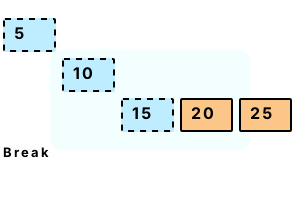
Break. This keyword alters control flow. Its meaning is clear in most programs—it means "stop." In loops it stops the loop. And in a switch it exits the switch.
Statement notes. Break statements are used in certain parts of a program. We use them in loops (like for and while) and switch statements. They cannot be used in some places.
Tip When a break is encountered in the IL, control is immediately transferred to the statement following the enclosing block.
using System;
// Part 1: create an array.
int[] array = { 5, 10, 15, 20, 25 };
// Part 2: use for-loop and break on value 15.
for (int i = 0; i < array.Length; i++)
{
Console.WriteLine("FOR: {0}", array[i]);
if (array[i] == 15)
{
Console.WriteLine("Value found");
break;
}
}
// Part 3: use foreach-loop and break on value 15.
foreach (int value in array)
{
Console.WriteLine("FOREACH: {0}", value);
if (value == 15)
{
Console.WriteLine("Value found");
break;
}
}FOR: 5
FOR: 10
FOR: 15
Value found
FOREACH: 5
FOREACH: 10
FOREACH: 15
Value found
Switch. We can use the break keyword in the switch statement. When break is encountered in a switch statement, the switch statement is exited. But the enclosing block is not.
Start The for-loop continues through all five iterations. Break does not break the loop.
Info The switch statement can confuse loop code. We might do better to put the switch statement itself in a method with a result value.
Tip We can employ object-level polymorphism. This calls different methods based on a virtual dispatch table.
using System;
// Loop through five numbers.
for (int i = 0; i < 5; i++)
{
// Use loop index as switch expression.
switch (i)
{
case 0:
case 1:
case 2:
{
Console.WriteLine("First three");
break;
}
case 3:
case 4:
{
Console.WriteLine("Last two");
break;
}
}
}First three
First three
First three
Last two
Last two
No enclosing loop. Sometimes a programmer is unhappy. The "break" keyword, when used outside of a loop, will break the program. It will not compile—an enclosing loop is required here.
class Program
{
static void Main()
{
break;
}
}Error CS0139
No enclosing loop out of which to break or continue
Yield. The C# language has a yield break statement. Here the compiler generates code that terminates the method from being called again after it returns.
Note In this sense, the yield break statement is more final than the yield return statement.
Tip Yield is implemented in the C# compiler—not at the level of the MSIL instructions.
Continue. This stops the current iteration and progresses to the next iteration of the loop. After it is encountered, the loop will execute no more remaining statements in that iteration.
A summary. Break stops loop iteration. We tested this keyword on loops. We also looked at the switch statement's somewhat confusing usage of the break keyword.
Dot Net Perls is a collection of tested code examples. Pages are continually updated to stay current, with code correctness a top priority.
Sam Allen is passionate about computer languages. In the past, his work has been recommended by Apple and Microsoft and he has studied computers at a selective university in the United States.
This page was last updated on May 25, 2023 (simplify).