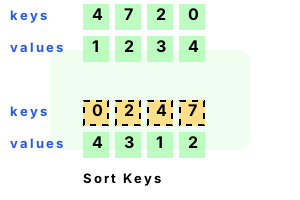
Array.Sort. This method orders elements in an array. It modifies the array in-place. It handles different types of elements, including strings and ints.
Key feature. Array.Sort has some important features. We can sort 2 arrays at once: one is used as the keys array, and a second is used as the values array.
Simple example. This program allocates an array of 4 integers. Next it calls the Array.Sort method. This sorts the elements in-place—we do not need to assign a variable.
Detail We enumerate the integers in the sorted array, printing them to the console.
using System;
// Simple sort call.
int[] values = { 4, 7, 2, 0 };
Array.Sort(values);
foreach (int value in values)
{
Console.Write(value);
Console.Write(' ');
}
Console.WriteLine();0 2 4 7
Array reference. This program creates an array. Then it references the newly-created int array as an Array. We can do this because the int[] type is derived from the Array type.
Next This Array reference is passed to the Array.Sort method, which can sort the elements.
And Before program completion, we display the sorted elements in the Array reference.
using System;
// Sort Array reference.
int[] values = { 4, 7, 2, 0 };
Array array = values;
Array.Sort(array);
foreach (int value in array)
{
Console.Write(value);
Console.Write(' ');
}
Console.WriteLine();0 2 4 7
Range example. This program creates an integer array upon the managed heap. Then, it calls the Array.Sort method with three arguments.
Info The arguments are the array reference (int[]), the starting index (0) and the number of elements to sort past that index.
Note This program uses 0, 3 to sort only the first three elements. It sorts a range of elements.
Tip You can see in the results that the first three elements are sorted in ascending numeric order.
And The fourth element 0 is still at the end because it was not included in the sorting operation.
using System;
// Sort range of elements.
int[] values = { 4, 7, 2, 0 };
Array.Sort(values, 0, 3);
foreach (int value in values)
{
Console.Write(value);
Console.Write(' ');
}
Console.WriteLine();2 4 7 0
Summary. Array.Sort has many overloads. We can modify the arguments to invoke the more sophisticated versions of the method. The List's Sort() method internally calls Array.Sort.
Dot Net Perls is a collection of tested code examples. Pages are continually updated to stay current, with code correctness a top priority.
Sam Allen is passionate about computer languages. In the past, his work has been recommended by Apple and Microsoft and he has studied computers at a selective university in the United States.
This page was last updated on Sep 21, 2023 (edit).