Array.Resize. This .NET method allocates a new array. It then copies existing element values to the new array. This logic is needed when an array's size is inadequate.
Notes, resizing. We show how Resize reallocates and copies elements. The arguments to Array.Resize are easy to understand (unless you are unfamiliar with the method).
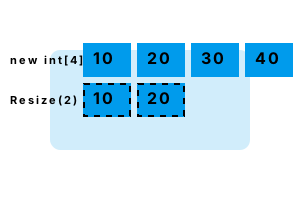
Shrink example. We use Array.Resize to replace a large array with a smaller one. This is useful if we have a large array of data, and want to only keep the first part.
Step 1 We initialize an array of ints. It has 4 elements, and we assign them all to integer values.
Step 2 We invoke Array.Resize with argument of 2. This call changes an array of 4 elements to one with 2 elements.
So We reduce the size of the array by 2 elements. Array.Resize can expand, or shrink an array's size.
using System;
// Step 1: initialize array for example.
int[] array = new int[4];
array[0] = 10;
array[1] = 20;
array[2] = 30;
array[3] = 40;
for (int i = 0; i < array.Length; i++)
{
Console.WriteLine("BEFORE: {0}", array[i]);
}
// Step 2: resize the array from 4 to 2 elements.
Array.Resize(ref array, 2);
for (int i = 0; i < array.Length; i++)
{
Console.WriteLine("AFTER: {0}", array[i]);
}BEFORE: 10
BEFORE: 20
BEFORE: 30
BEFORE: 40
AFTER: 10
AFTER: 20
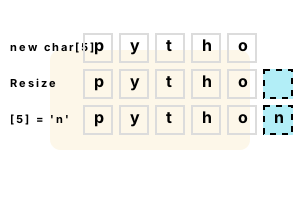
Grow example. Next we expand an array's size. This can be useful for certain data structures, such as those that must accommodate more data but have minimal memory footprint.
Warning If we omit the Array.Resize call, we will get an IndexOutOfRangeException. This exception should be avoided.
using System;
// Initialize an array with 5 elements.
char[] array = new char[5];
array[0] = 'p';
array[1] = 'y';
array[2] = 't';
array[3] = 'h';
array[4] = 'o';
// We need an array with 6 elements.// ... Use Array.Resize to make a new array.
Array.Resize<char>(ref array, 6);
// Assign the last element.
array[5] = 'n';
// Display the array.
Console.WriteLine(new string(array));python
Notes, internals. A call to Array.Resize runs through an algorithm that determines that the array needs to be larger or smaller. It copies the array, and then changes the reference.
So Array.Resize does not resize the array. It replaces the array with a new one of a different size.
Copying an array completely when resizing it is wasteful in many situations. For these cases, use List—call Add() to add to empty space on the end.
But Sometimes Array.Resize can lead to better performance. Arrays boost memory efficiency and lookup speed.
A summary. Array.Resize does not change existing arrays. It allocates and copies elements into a new array. It is useful only when arrays are required.
Dot Net Perls is a collection of tested code examples. Pages are continually updated to stay current, with code correctness a top priority.
Sam Allen is passionate about computer languages. In the past, his work has been recommended by Apple and Microsoft and he has studied computers at a selective university in the United States.