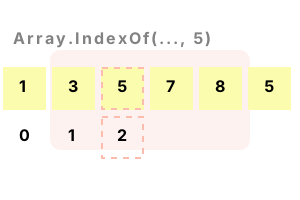
Array.IndexOf. This .NET method searches an array from start to end. It acts upon an array of any type, and returns the position of the value. LastIndexOf goes from end to start.
IndexOf, in both its generic form and its LastIndexOf form, is useful in many programs. This is declarative (method-based) programming.
IndexOf example. The Array type is an abstract base type, which means it can be used with instances of arrays in your program. We call the Array.IndexOf static method.
Here We see successful calls to Array.IndexOf. Each call finds the expected value in the array.
using System;
// Example integer array is declared.
int[] array = new int[6];
array[0] = 1;
array[1] = 3;
array[2] = 5;
array[3] = 7;
array[4] = 8;
array[5] = 5;
// Find index of element with value 5.
int index1 = Array.IndexOf(array, 5);
// Find index of value 3.
int index2 = Array.IndexOf<int>(array, 3);
// Find last index of 5.
int index3 = Array.LastIndexOf(array, 5);
// Write the results.
Console.WriteLine(index1);
Console.WriteLine(index2);
Console.WriteLine(index3);2
1
5
String example. Here we use a string array and Array.IndexOf. The result of IndexOf is -1 when the value is not found. The IndexOf method uses the default IEqualityComparer for the type.
Tip String contents are tested. So it does not matter where the strings come from, as long as their contents are the same.
using System;
// Example string array is declared.
string[] array = new string[6];
array[0] = null;
array[1] = "carrot";
array[2] = "rat";
array[3] = "";
array[4] = "carrot";
array[5] = "apple";
// Find string with this value starting at offset 2.
int index1 = Array.IndexOf(array, "carrot", 2, 3);
// Find a nonexistent string.
int index2 = Array.IndexOf(array, "banana");
// Write the result.
Console.WriteLine(index1);
Console.WriteLine(index2);4
-1
LastIndexOf. Array.LastIndexOf finds the last matching element. It searches from the end of an array. It returns the index of the element that contains the specified value.
Here We call Array.IndexOf once, and Array.LastIndexOf twice. When IndexOf finds the value 6, it returns the int value 2.
And When LastIndexOf finds the value 6, it returns the index 4. The 2 methods search from opposite starting points.
using System;
int[] array = { 2, 4, 6, 8, 6, 2 };
int result1 = Array.IndexOf(array, 6);
Console.WriteLine(result1);
int result2 = Array.LastIndexOf(array, 6);
Console.WriteLine(result2);
int result3 = Array.LastIndexOf(array, 100);
Console.WriteLine(result3);2
4
-1
Benchmark. Here we test IndexOf performance. Internally, the generic method has lots of error checking for invalid arguments, and calls into a virtual method depending on the type.
Version 1 This version of the code uses the Array.IndexOf generic method to find the index of the argument.
Version 2 Here we use a custom method IndexOfInt(), which uses a for-loop to iterate over the array elements, testing each one.
using System;
using System.Diagnostics;
class Program
{
static int[] _array = { 3, 5, 7, 9, 11, 13 };
const int _max = 1000000;
static void Main()
{
// Version 1: use Array.IndexOf.
var s1 = Stopwatch.StartNew();
for (int i = 0; i < _max; i++)
{
int index = Array.IndexOf<int>(_array, 7);
if (index == -1)
{
return;
}
}
s1.Stop();
// Version 2: use for-loop.
var s2 = Stopwatch.StartNew();
for (int i = 0; i < _max; i++)
{
int index = IndexOfInt(_array, 7);
if (index == -1)
{
return;
}
}
s2.Stop();
Console.WriteLine(((double)(s1.Elapsed.TotalMilliseconds * 1000000) / _max).ToString("0.00 ns"));
Console.WriteLine(((double)(s2.Elapsed.TotalMilliseconds * 1000000) / _max).ToString("0.00 ns"));
}
static int IndexOfInt(int[] arr, int value)
{
for (int i = 0; i < arr.Length; i++)
{
if (arr[i] == value)
{
return i;
}
}
return -1;
}
}11.14 ns Array.IndexOf
4.77 ns for-loop
Notes, not found condition. Array.LastIndexOf, like Array.IndexOf, uses an error code of negative one to indicate a not-found condition. This can be at first confusing.
Note Error conditions are most logically represented by a separate true or false value, not the value -1.
Discussion. Arrays are lower-level types than other types such as the List in .NET. When you use arrays you should expect to have to do some looping on your own.
So Consider using a for-loop. You can improve an algorithm by combining multiple loops into one (loop jamming).
Also If you wanted a high-level collection it would be better to use the List type.
Finally IndexOf and LastIndexOf reduce performance even in simple situations. They are not good for performance-critical code.
We tested the Array.IndexOf method and found it to be much slower than searching with a custom method. We tested the generic form of Array.IndexOf as well.
Dot Net Perls is a collection of tested code examples. Pages are continually updated to stay current, with code correctness a top priority.
Sam Allen is passionate about computer languages. In the past, his work has been recommended by Apple and Microsoft and he has studied computers at a selective university in the United States.
This page was last updated on Jun 3, 2023 (simplify).