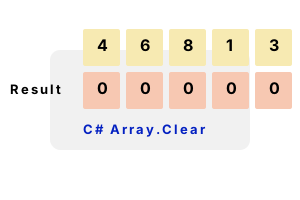
Array.Clear. This C# method zeros out elements in a range. It is a one-line, reliable and understandable way to empty or clear your array.
Method notes. Clear() works on arrays of any type—including numbers, booleans, structs and class instances. We can provide a start index, and a length.
using System;
int[] integerArray = { 4, 6, 8, 1, 3 };
Console.WriteLine(string.Join(",", integerArray));
// Clear all elements in the array.
Array.Clear(integerArray, 0, integerArray.Length);
Console.WriteLine(string.Join(",", integerArray));4,6,8,1,3
0,0,0,0,0
Example 2. This example shows an array of objects, each with 2 properties. The Array.Clear method is used to set the first 2 references in the array to null.
using System;
class Program
{
class Employee
{
public string Name { get; set; }
public int Salary { get; set; }
}
static void Main()
{
Employee[] employees = new Employee[3];
employees[0] = new Employee() { Name = "Bob", Salary = 10000 };
employees[1] = new Employee() { Name = "Susan", Salary = 13000 };
employees[2] = new Employee() { Name = "John", Salary = 20000 };
//// Display the employee array.//
Console.WriteLine("--- Employee array before ---");
foreach (Employee employee in employees)
{
Console.Write(employee.Name);
Console.Write(": ");
Console.WriteLine(employee.Salary);
}
//// Clear first two elements in employee array.//
Array.Clear(employees, 0, Math.Min(2, employees.Length));
//// Display the employee array.//
Console.WriteLine("--- Employee array after ---");
foreach (Employee employee in employees)
{
if (employee != null)
{
Console.Write(employee.Name);
Console.Write(": ");
Console.WriteLine(employee.Salary);
}
else
{
Console.WriteLine("null");
}
}
}
}--- Employee array before ---
Bob: 10000
Susan: 13000
John: 20000
--- Employee array after ---
null
null
John: 20000
Performance, Array.Clear. Here we test the performance of the Array.Clear method. Logically, Array.Clear could be implemented with a for-loop.
Version 1 The Array.Clear method is invoked. It clears the 128-element int array that was allocated as a local variable.
Version 2 Here we use a for-loop and assign each element to zero. We time this version and the previous version.
Result In 2021 with .NET 5 for Linux, Array.Clear is much faster—Clear() has apparently undergone some performance optimizations.
using System;
using System.Diagnostics;
const int _max = 10000;
int[] array = new int[128];
// Version 1: clear with Array.Clear.
var s1 = Stopwatch.StartNew();
for (int i = 0; i < _max; i++)
{
Array.Clear(array, 0, array.Length);
}
s1.Stop();
// Version 2: clear with for-loop.
var s2 = Stopwatch.StartNew();
for (int i = 0; i < _max; i++)
{
for (int z = 0; z < array.Length; z++)
{
array[z] = 0;
}
}
s2.Stop();
Console.WriteLine(((double)(s1.Elapsed.TotalMilliseconds * 1000000) / _max).ToString("0.00 ns"));
Console.WriteLine(((double)(s2.Elapsed.TotalMilliseconds * 1000000) / _max).ToString("0.00 ns")); 14.45 ns Array.Clear
107.94 ns for
Discussion. Boolean arrays are cleared by having all their elements assigned to false. Also, struct arrays will be cleared the same way as other arrays of System.ValueType instances.
Note All struct fields will be set to null or 0, depending on their type. The default value can be found with the default operator.
Summary. Array.Clear is frequently useful in programs. It is a one-line way of resetting your entire array to its default values. It works on arrays of values and references.
Dot Net Perls is a collection of tested code examples. Pages are continually updated to stay current, with code correctness a top priority.
Sam Allen is passionate about computer languages. In the past, his work has been recommended by Apple and Microsoft and he has studied computers at a selective university in the United States.
This page was last updated on Feb 16, 2024 (edit).